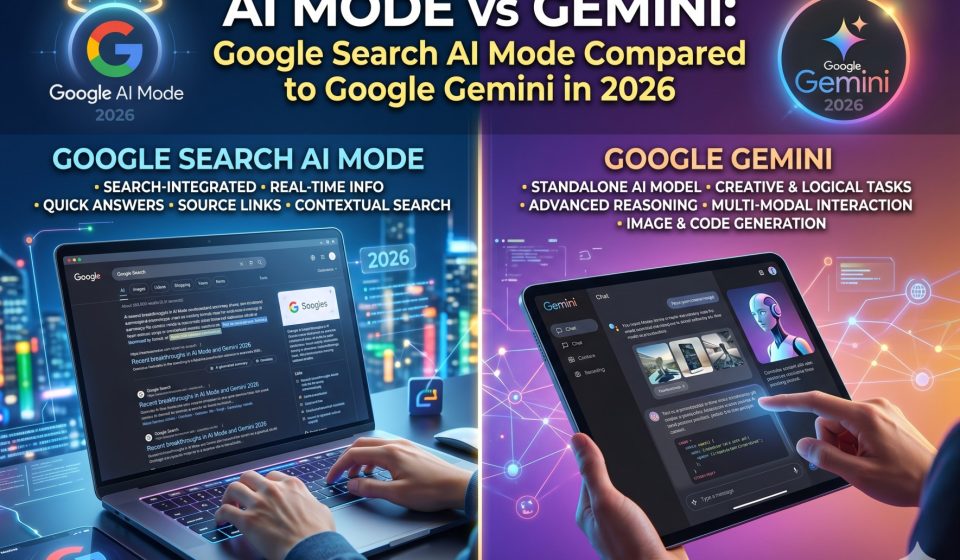

Google now ships two distinct AI-powered products that confuse even experienced users: AI Mode inside Google Search and Google Gemini as a standalone AI assistant. They look similar on the surface because both are powered by Google’s language models, both generate conversational responses, and both sit inside Google’s product ecosystem. But they are built for fundamentally different jobs.
This guide clarifies exactly what AI Mode is, what Gemini is, where they overlap, where they diverge, and which one you should be using for which task. It also covers what happens when neither product fully meets your needs and how to move your existing conversation history to a more capable alternative.
What Is Google AI Mode in Search
AI Mode is Google’s AI-generated answer layer built directly into the Google Search results page. It was introduced as part of Google’s Search Generative Experience initiative and has since become available to a broader user base as a toggled feature within standard Google Search.
When you enable AI Mode, Google generates a synthesized conversational response at the top of your search results page. Instead of showing only a list of blue links, it produces a structured answer that draws from multiple web sources and presents a summary alongside citations.
What AI Mode is designed for:
- Quick factual lookups that benefit from synthesis across multiple sources
- Comparison questions where the answer spans several websites
- How-to queries where a step-by-step synthesis is more useful than ten separate links
- Research starting points where you want an overview before diving into source documents
What AI Mode is not designed for:
- Multi-turn conversation that builds on previous exchanges
- Long-form writing, editing, or content creation
- Complex reasoning tasks that require holding a large body of information in context
- Persistent project work where you return to the same thread over multiple sessions
AI Mode is a search enhancement. It makes Google Search smarter and more conversational. It is not an AI assistant in the same sense that Gemini is.
What Is Google Gemini
Google Gemini is a standalone AI assistant product. It exists at gemini.google.com, inside the Google app on mobile, and as Gemini Advanced for Google One subscribers. Gemini is built on Google’s Gemini language model family, with Gemini 1.5 Pro and Gemini 1.5 Flash being the models most users interact with.
What Gemini is designed for:
- Extended multi-turn conversations where context builds across many exchanges
- Document analysis, summarization, and question-answering on uploaded files
- Writing assistance including drafts, edits, rewrites, and formatting
- Coding help across multiple programming languages
- Deep integration with Gmail, Docs, Drive, Sheets, and other Google Workspace tools
- Image analysis and multimodal reasoning
Gemini is a full AI assistant. It is meant to be your AI collaborator for ongoing work, not just a smarter search box.
AI Mode vs Gemini: The Core Differences
Understanding the distinction between these two products requires looking at how they handle five key dimensions:
Conversation memory
AI Mode has no meaningful persistent memory between sessions. Each search query is treated independently. If you ask a follow-up question, AI Mode can handle limited context within a single search session, but it does not remember a conversation from yesterday.
Gemini maintains conversation history within and across sessions. You can return to a Gemini thread from last week and continue where you left off. This makes Gemini suitable for long-running projects while AI Mode is suited only to one-off lookups.
Document and file handling
AI Mode does not accept file uploads. It works only with the text of your search query and the content it retrieves from the web.
Gemini accepts PDF uploads, Google Docs, spreadsheets, images, and other file types. You can share an entire report with Gemini and ask it to analyze, summarize, critique, or rewrite sections.
Writing and content creation
AI Mode generates short synthesized answers. It is not a writing tool and does not produce drafts, long-form content, or formatted documents.
Gemini can write full blog posts, business proposals, code documentation, emails, cover letters, and any other document type you specify, with formatting, length, and tone adjusted to your instructions.
Integration with Google Workspace
AI Mode connects only to Google Search. It does not access your Gmail, Drive, or Docs.
Gemini with workspace extensions can read your emails, summarize your documents, search your Drive, and draft replies or documents based on content from your actual Google account.
Task complexity
AI Mode handles simple to moderately complex informational queries well. It degrades on multi-step reasoning, nuanced comparisons, or tasks that require holding a complex body of information in mind.
Gemini handles high-complexity tasks, long multi-step instructions, and extended reasoning chains across documents and conversation history.
When to Use AI Mode Instead of Gemini
AI Mode is the right tool when:
- You want a fast, sourced answer to a specific question and do not need to continue the conversation
- You are doing exploratory research and want a synthesized overview with citations before going deeper
- You are using Google Search as your starting point and want the results to be more useful without switching to a separate tool
- The question is factual and self-contained, not part of an ongoing project
AI Mode saves time on the kind of lookups where you would otherwise open five tabs and skim each one. It is genuinely useful for that job.
When to Use Gemini Instead of AI Mode
Gemini is the right tool when:
- You need an AI assistant that remembers the context of previous sessions
- You are working on a document, presentation, codebase, or research project that spans multiple work sessions
- You want to upload files and ask questions about their content
- You need writing, editing, or content creation rather than just a factual summary
- You want an AI that can access your Gmail, Docs, or Drive to understand your actual work context
Most professional use cases belong in Gemini rather than AI Mode.
When Neither AI Mode nor Gemini Is Enough
Both products have real limitations that drive users toward alternatives:
AI Mode limitations:
- No file handling, no persistent memory, no writing capability
- Answer quality depends entirely on what Google’s retrieval system finds, which can be inconsistent for niche topics
- Hallucination risk exists even in AI Mode responses, and citations do not always match the claims made
Gemini limitations:
- Context window performance at very high token counts can be inconsistent
- Users working with extremely long documents or entire codebases sometimes find Claude more reliable
- Conversation export and portability are limited, which creates lock-in over time
- The free tier has significant capability restrictions compared to Gemini Advanced
For users who find Gemini’s limitations affecting their work, the most common upgrade path is to Claude by Anthropic. Claude’s 200,000-token context window, lower hallucination rate, and stronger long-form reasoning make it the preferred tool for the most demanding professional use cases.
If you have built up significant conversation history in Gemini and want to continue that work in Claude, the Gemini to Claude desktop migration tool at gemini2claude.com transfers the complete thread history, including formatting and context, directly between accounts without passing any data through a third-party server.
How AI Mode and Gemini Fit Into the Broader AI Landscape
Google is not the only company offering both a search-integrated AI answer layer and a standalone conversational assistant. Microsoft operates the same split with Bing AI (now Microsoft Copilot in search) and standalone Microsoft Copilot. The pattern is becoming standard across major search and productivity platforms.
This means users increasingly need to understand not just one AI tool but a portfolio of them:
- For search and quick lookups: AI Mode, Bing AI, or Perplexity
- For extended project work and document analysis: Gemini Advanced, Claude, or ChatGPT
- For code and developer workflows: Claude, ChatGPT with Code Interpreter, or GitHub Copilot
- For email and calendar work within a productivity suite: Gemini in Workspace or Microsoft Copilot in Microsoft 365
Understanding where each tool fits avoids the frustration of using the wrong instrument for a given job.
Switching From Gemini to a More Capable Alternative
For users who have been relying on Gemini as their primary AI assistant and are ready to evaluate Claude or ChatGPT, the practical concern is always the same: what happens to existing conversation history.
Months of project context, research threads, and iterative conversations represent real intellectual work. Losing that context when switching platforms means starting over rather than continuing.
TransferLLM provides direct migration paths for every major switch:
- To move your Gemini conversation history to Claude, the gemini2claude desktop tool handles the complete migration locally. No data touches external servers.
- To bring your ChatGPT archives into Claude, chatgpt2claude.com runs the same local-only transfer process.
- To move your ChatGPT history into Gemini, chatgpt2gemini.com preserves full thread structure across the migration.
The complete guide to transferring Gemini conversations on the TransferLLM blog explains each step in detail, including how formatting, code blocks, and message context are handled during conversion.
The Technical Difference Between AI Mode and Gemini Models
Both AI Mode and Gemini are powered by Google’s Gemini model family, but they use different configurations optimized for different objectives.
AI Mode uses lighter, faster model inference optimized for low-latency responses in a search context. Speed matters more than depth because users expect search results within seconds.
Gemini Advanced uses the full Gemini 1.5 Pro model, which prioritizes depth, nuance, and extended context over raw speed. This is why Gemini Advanced handles long documents and complex reasoning tasks that AI Mode cannot.
The same underlying architecture, optimized differently, produces meaningfully different user experiences depending on the use case.
AI Mode vs Gemini: Quick Reference Summary
| Dimension | Google AI Mode | Google Gemini Advanced |
|---|---|---|
| Primary purpose | Enhanced search answers | Full AI assistant |
| Persistent memory | No | Yes |
| File upload support | No | Yes |
| Writing and editing | No | Yes |
| Google Workspace integration | No | Yes |
| Context window | Session-only | Up to 1M tokens |
| Available on | Google Search | gemini.google.com, mobile app |
| Cost | Free with Search | Google One subscription for Advanced |
| Best for | Quick factual lookups | Extended project work |
Frequently Asked Questions
1. Is AI Mode the same thing as Gemini?
No. AI Mode is a feature embedded within Google Search that generates synthesized answers at the top of search results. Gemini is a standalone AI assistant product built for extended conversation, document analysis, writing, and deep workspace integration. Both use Google’s Gemini models but are optimized for completely different use cases.
2. Which is better for research: AI Mode or Gemini?
For quick background research and sourced overviews, AI Mode is faster and more convenient. For deep research involving uploaded documents, long multi-session conversations, and complex analysis, Gemini Advanced is the correct tool. For research that requires verifiable citations on every claim, Perplexity AI is also worth considering alongside both Google products.
3. Can I use AI Mode to continue a Gemini conversation?
No. AI Mode has no access to your Gemini conversation history. The two products are separate and do not share session data. Continuing a project requires returning to Gemini or another AI assistant that stores conversation history.
4. If I switch from Gemini to Claude, do I lose my conversation history?
Not if you use a migration tool. The Gemini to Claude transfer tool at gemini2claude.com migrates your complete conversation history directly to your Claude account from your own device. Nothing is uploaded to any third-party server during the process.
5. Does Gemini Advanced justify the cost compared to free AI tools?
For users who rely on Google Workspace and benefit from Gemini’s ability to access Gmail, Docs, and Drive directly, the integration value alone often justifies the subscription. For users who primarily need a standalone AI assistant without workspace integration, Claude and ChatGPT offer competitive free tiers, and their paid plans provide comparable or superior capabilities depending on the task.