
How to Optimize Claude Chat for Better AI Conversations and Productivity
Most people use Claude casually. They type a quick question, get a response, and move on. That habit leaves a lot of value on the table.
Poor prompts produce weak outputs. Messy context slows everything down. Bad workflow habits turn a powerful AI tool into a frustrating one.
This guide covers Claude chat optimization from the ground up. You will learn better prompting, smarter context management, and how to build AI workflows that save real time.
What Is Claude Chat Optimization?
Understanding Claude AI Capabilities
Claude is a large language model built by Anthropic. It reads your input, processes context, and generates a response based on what you asked and how you asked it.
The quality of your output depends directly on the quality of your input. Claude does not guess your intent. It responds to what you actually write.
Why Optimization Matters for AI Conversations
Claude chat optimization means structuring your prompts, context, and workflow to get better results faster. It reduces back-and-forth. It improves output accuracy.
Optimized conversations save time. They also produce more consistent results across repeated tasks.
Common Problems Users Face With Claude
Users often write vague prompts. They overload context with irrelevant information. They expect perfect results in a single attempt.
These habits lead to off-target responses, repeated corrections, and slower productivity. Fixing them takes less effort than most people think.
Benefits of Optimizing Claude Chat
Faster and More Accurate Responses
Clear prompts get precise answers. When you define your goal upfront, Claude spends less time interpreting and more time delivering exactly what you need.
Improved Productivity and Workflow Automation
Optimized AI workflows cut repetitive tasks. You build reusable prompt templates, chain outputs across tasks, and automate steps you used to handle manually.
Better Context Retention
Claude holds a lot of context in one conversation. Good optimization keeps that context clean and relevant so responses stay sharp throughout the session.
Reduced Prompt Repetition
When you structure prompts well from the start, you stop rewriting the same instructions. One solid prompt replaces five average ones.
How Claude Processes Prompts and Context
Understanding Context Windows
Claude reads everything in the active conversation window. That includes your prompts, previous responses, and any background information you provide.
Too much irrelevant content dilutes the signal. Claude may focus on the wrong part of your input. Keep context focused and purposeful.
Why Clear Instructions Matter
Ambiguous instructions produce ambiguous results. Claude follows what you write, not what you meant to write.
Use direct language. State the task clearly. Specify the format, tone, and length when those details matter.
Role of Structured Prompts in AI Accuracy
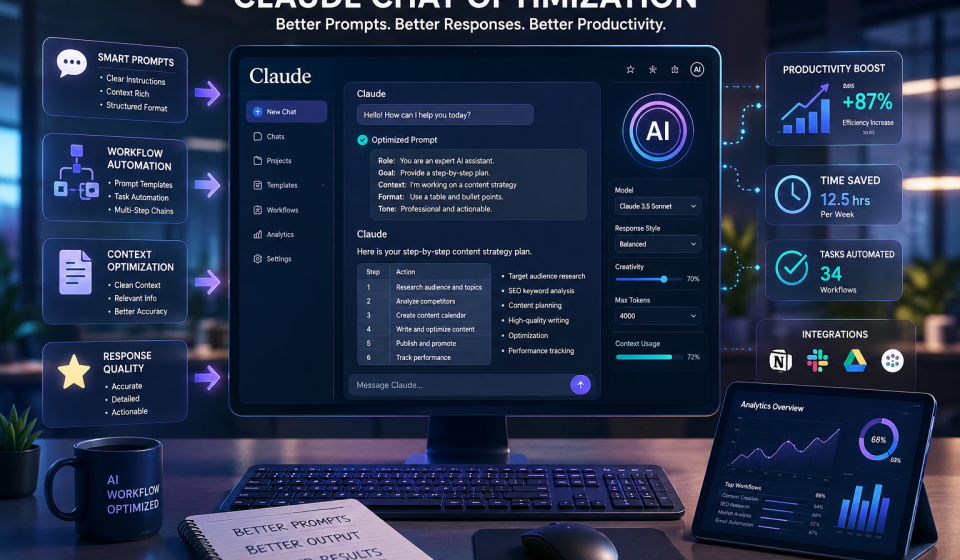
Structured prompts give Claude a framework to work within. When you define a role, set a goal, and list constraints, Claude produces more targeted outputs with fewer misses.
Best Claude Chat Optimization Techniques
Use Structured Prompt Frameworks
Role-Based Prompting
Tell Claude who to be. “Act as a senior content strategist” sets expectations before the task begins. Role context shapes tone, depth, and perspective.
Step-by-Step Prompting
Break instructions into numbered steps. Claude follows sequential logic well. Numbered steps reduce ambiguity and produce cleaner, organized outputs.
Goal-Oriented Prompting
Start with the end goal. “My goal is to create a 500-word product description that converts” tells Claude exactly what success looks like before it writes a word.
Keep Context Organized
Use Sections and Formatting
Use headers and labels inside your prompts. Sections like “Background,” “Task,” and “Output Format” help Claude locate information fast without sifting through dense paragraphs.
Remove Unnecessary Information
Cut anything Claude does not need to complete the task. Extra background, unrelated history, and filler words all reduce output quality.
Maintain Topic Consistency
Stick to one topic per conversation when possible. Mixing unrelated tasks in a single thread confuses context and reduces response accuracy.
Optimize Prompt Length
Short prompts work for simple tasks. Complex outputs need detailed prompts. Match prompt length to task complexity and you will see immediate improvement in response quality.
Use Examples for Better Outputs
Show Claude what you want. Include one or two examples inside your prompt. Claude uses them as a reference and mirrors the format, tone, and structure you demonstrated.
Break Complex Tasks Into Smaller Prompts
Large, multi-part tasks often produce inconsistent results in a single prompt. Split them into focused steps. Complete each step before moving to the next one.
Create Reusable Prompt Templates
Build a library of tested prompts for tasks you repeat often. Reusable templates save setup time and deliver consistent results across different projects and team members.
Advanced Claude Chat Optimization Strategies
Multi-Step AI Workflows
Design workflows where each prompt builds on the last. Claude handles research in step one, drafts content in step two, and edits for tone in step three. Each step feeds the next.
Prompt Chaining Techniques
Prompt chaining connects outputs across multiple Claude conversations or steps. The output from one prompt becomes the input for the next. This approach scales well for long or complex projects.
Combining Claude With Other AI Tools
Claude works well alongside other tools. Pair it with dedicated SEO platforms, content schedulers, or coding environments to cover gaps and extend its output across your full workflow.
One tool worth knowing is TransferLLM. It helps users migrate AI conversation history and prompt libraries between platforms. If you switch between Claude and other LLMs, TransferLLM keeps your workflows intact and prevents data loss during transitions.
Automating Repetitive AI Tasks
Identify tasks you ask Claude to repeat weekly. Build a prompt system around them. Automation reduces cognitive load and keeps output quality steady across large volumes of work.
AI Collaboration for Teams and Businesses
Teams benefit most from shared prompt systems. Standardized prompts ensure everyone gets consistent Claude outputs regardless of individual skill level or prompting experience.
Claude Chat Optimization for Different Use Cases
Content Writing
Claude excels at drafts, rewrites, and editing. Give it a clear brief, a tone reference, and a target word count. The output lands close to ready-to-publish most of the time.
SEO and Keyword Research
Use Claude to generate keyword clusters, meta descriptions, and content briefs. Combine its output with dedicated SEO tools for a stronger, data-backed strategy.
Coding and Development
Claude writes, explains, and debugs code. Specify the language, the expected behavior, and any constraints. Structured prompts here save significant development time.
Customer Support Automation
Build prompt templates for common customer scenarios. Claude generates consistent, helpful responses that your team can review and send without starting from scratch each time.
Research and Documentation
Claude reads long inputs and summarizes them clearly. Use it for competitive research, report drafts, and internal documentation that needs fast turnaround.
Business Productivity
From meeting summaries to email drafts to project plans, Claude handles routine business writing well. Optimized prompts make every task faster without sacrificing quality.
Common Claude Optimization Mistakes to Avoid
Using Vague Prompts
“Write something about marketing” tells Claude almost nothing. Vague prompts produce generic outputs. Be specific about the task, the audience, and the desired outcome.
Overloading Context Windows
Pasting entire documents and long histories into every prompt creates noise. Claude has to filter through it. Keep context tight and directly relevant to your current task.
Ignoring Output Formatting
Claude can format output as lists, tables, headers, or plain text. If you do not specify, it guesses. Always define the format you need to avoid reformatting work after the fact.
Not Refining AI Responses
First outputs are starting points, not final products. Review Claude’s response, identify gaps, and refine with a follow-up prompt. One extra step often produces dramatically better results.
Expecting Perfect Results in One Prompt
Complex tasks rarely produce perfect outputs in a single attempt. Plan for iteration. Two or three focused prompts will outperform one overloaded prompt almost every time.
Claude Chat Optimization Tools and Resources
Prompt Libraries
Store and organize your best prompts. A shared prompt library keeps your whole team working from tested, high-performing inputs instead of rebuilding from scratch each time.
AI Workflow Tools
Platforms like Zapier and Make connect Claude’s outputs to other apps. Automate delivery, formatting, and filing without manual steps in between.
Browser Extensions
Several browser extensions add prompt management directly to your Claude chat interface. They speed up access to saved templates and improve session consistency.
AI Collaboration Platforms
Team-focused platforms let you share Claude sessions, build shared prompt systems, and track output quality across projects and departments.
Transfer and Migration Tools
TransferLLM stands out here. It handles AI conversation and prompt data migration between LLM platforms cleanly. Teams that use multiple AI tools rely on it to keep their workflows portable and organized.
Claude vs Other AI Platforms for Optimization
Claude vs ChatGPT
Claude handles longer context windows better. It also follows structured formatting instructions more consistently. ChatGPT has a broader plugin ecosystem but Claude’s output quality on writing tasks is competitive.
Claude vs Gemini
Gemini integrates tightly with Google’s product suite. Claude performs better on nuanced writing and reasoning tasks. Your choice depends on where your workflow lives and what outputs you prioritize.
Workflow Flexibility Comparison
Claude fits naturally into content, research, and coding workflows. Its context handling gives it an edge for long-form projects where consistency across a session matters most.
Context Handling Comparison
Claude’s context window is one of its strongest advantages. It reads more background per session and maintains coherence longer than many competing models.
Best Practices for Long-Term Claude AI Efficiency
Build Standardized Prompt Systems
Create standard prompt formats for every repeated task type. Standardization removes guesswork and keeps output quality high across your entire team.
Document High-Performing Prompts
When a prompt consistently produces great results, save it. Document what made it work. That knowledge compounds over time into a powerful internal resource.
Continuously Test Prompt Variations
Treat prompting like a process, not a fixed skill. Test variations, compare outputs, and refine regularly. Small adjustments often produce noticeable improvements in quality and speed.
Monitor AI Output Quality
Review Claude’s outputs on a regular basis. Check for accuracy, relevance, and alignment with your goals. Catching quality drift early saves significant correction time later.
FAQ Section (People Also Ask Style)
What is Claude chat optimization?
Claude chat optimization refers to improving prompts, workflows, and context handling to get better AI responses and productivity.
How can I improve Claude AI responses?
Use structured prompts, clear goals, examples, and organized context to improve response quality.
Does prompt engineering help Claude AI?
Yes. Prompt engineering significantly improves output accuracy, formatting, and workflow efficiency.
What are the best Claude prompt optimization techniques?
Role-based prompts, prompt chaining, reusable templates, and step-by-step instructions work best.
How do businesses optimize Claude AI workflows?
Businesses optimize Claude using automation systems, workflow templates, and standardized prompt structures.
Can Claude handle long conversations effectively?
Yes, but optimizing context and removing irrelevant information improves performance.
Is Claude better than ChatGPT for long-form tasks?
Claude is often preferred for long context handling and structured writing workflows.
What mistakes should I avoid when using Claude AI?
Avoid vague prompts, excessive context, unclear formatting requests, and unrealistic expectations.
Final Thoughts on Claude Chat Optimization
Key Takeaways
Claude chat optimization is not about technical tricks. It is about writing clearly, thinking in structure, and building repeatable systems. Anyone can do it with consistent practice.
Future of AI Workflow Optimization
AI workflows will grow more connected and automated. Teams that build strong prompt systems now will scale faster and adapt more easily as tools continue to evolve.
How Businesses Can Scale AI Productivity
Start with standardized prompts. Build a shared library. Use tools like TransferLLM to keep your AI data portable across platforms. Scale what works and refine what does not.
The teams that win with AI are not the ones with the best tools. They are the ones with the best systems around those tools.