
You’ve built months of valuable conversations in ChatGPT. Now you want to move to Claude. The big question is: how do you transfer ChatGPT chats safely without losing data or exposing private information?
This is more common than you think. Thousands of users switch between AI platforms every month. Most of them don’t know the risks until something goes wrong.
This guide covers everything. You’ll understand the real dangers of moving your data carelessly, the methods that actually protect you, and the tools built specifically for secure chat transfer. By the end, you’ll know exactly what to do.
ChatGPT Chat Transfer Risks You Must Know Before You Start
Most people default to copy-paste when they want to move their chats. It feels simple. It feels fast. But manual transfer creates problems that are easy to overlook and hard to fix after the fact.
Your Conversations Contain More Than You Think
Go back and read a few of your old ChatGPT chats. You’ll likely find names, email addresses, business ideas, financial decisions, and personal details scattered throughout.
That information adds up fast. Pasting it into random websites or unverified apps without reading their privacy policy puts your data at risk. Data security starts before the first file moves.
You Will Lose Context and Formatting
ChatGPT conversations have structure. Long threads, code blocks, numbered lists, and multi-turn exchanges all carry context. When you copy manually, that structure breaks down.
You lose the flow of the conversation. Sentences get cut off. Lists collapse into unreadable blocks. What you paste into Claude is a fragment, not a full conversation. Safe migration means keeping your data whole.
Unsecured Websites Store Your Files
Search for “ChatGPT to Claude converter” and you’ll find dozens of free tools. Some of them work. But many of them upload your file to a remote server and keep a copy.
Your private conversations sit on someone else’s infrastructure indefinitely. That is the opposite of a secure chat transfer. Always confirm whether a tool processes data locally or sends it off-site.
Manual Copying Has No Audit Trail
When you copy and paste, there’s no record of what transferred and what didn’t. You can’t verify that everything made it across. You can’t check for errors until you need something that’s missing.
A proper ChatGPT export process creates a complete, verifiable file. Manual copying creates gaps you won’t notice until it’s too late.
You Face a Real-Time Cost
If you have hundreds of conversations, manual copying isn’t just risky – it’s impractical. It takes hours to move even a modest chat history by hand. That time has real value. A better method saves it.
How to Transfer ChatGPT Chats Safely – 3 Proven Methods
Three methods work well for moving your data. Each suits a different situation. Use the one that fits your needs and your comfort level with technology.
Method 1: Official ChatGPT Export
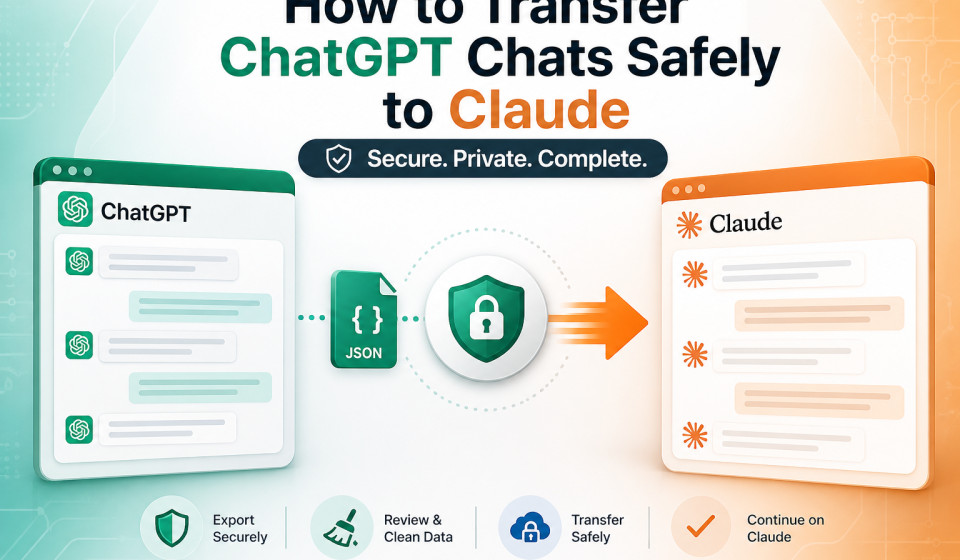
OpenAI built a data export feature directly into ChatGPT. This is the safest and most reliable starting point for any safe migration. It creates a complete file with no manual errors.
Here’s how to use it step by step:
- Open ChatGPT and click your profile icon
- Go to Settings, then Data Controls
- Select Export Data and confirm your email
- Wait for OpenAI to email you a download link
- Download and save the ZIP file in a secure location
Inside the ZIP, you’ll find your full conversation history in JSON format. This is your official ChatGPT export file. It’s clean, complete, and structured correctly.
Method 2: Review and Clean Your Data First
Before you transfer anything to Claude, open your export file and look through it. This step takes time, but it’s worth it.
Remove conversations that contain outdated sensitive information. Delete anything you no longer need. Strip out personal details that don’t belong in a new platform.
Privacy isn’t just about how you move data. It’s about being intentional with what you move. Cleaning your file reduces your exposure before the transfer begins.
Method 3: Direct Import Into Claude
Claude supports conversation imports through your account settings. Once your file is clean, upload it directly. This keeps the entire process between you and trusted platforms.
No third-party tool, no external server, no unknown privacy policy. This method is the cleanest option when Claude’s native import supports your file format.
Check your Claude settings for the most current import options. The feature set continues to expand as more users make the switch from other AI platforms.
Best Tool for Secure Chat Transfer From ChatGPT to Claude
Sometimes you need speed and scale. If you have a large chat history or want to preserve formatting perfectly, a dedicated tool makes the process far more reliable.
What to Look for in a Transfer Tool
The market has many options. Most of them are not built with your privacy in mind. Before you trust any tool with your conversations, check these four things:
Local processing – The tool should handle your file entirely on your device. If your data leaves your machine, you lose control of it. That is a fundamental data security requirement.
No data retention – A trustworthy tool deletes your data after the transfer completes. Read the privacy policy carefully. If it’s vague about data retention, walk away.
Encryption during transfer – Any tool worth using encrypts your file during processing. End-to-end encryption ensures that even if something goes wrong, your data stays protected.
Clean format conversion – ChatGPT exports JSON files. Claude reads specific formats. A good tool bridges that gap cleanly, preserving conversation structure, timestamps, and context.
TransferLLM: Built for This Exact Job
TransferLLM is built specifically for this problem. It bridges the gap between AI platforms so you can move your conversation history without manual work.
It reads your existing chats, formats them properly, and brings them into your new platform in a way that actually makes sense.
How to Use TransferLLM
There are only three real steps here.
1. Connect Your Accounts
Securely connect your source and target AI platforms. No setup required. Just link your accounts once and get ready to transfer your conversations instantly.
2. Select Conversations
Choose specific chats or transfer your entire conversation history. Easily select what you need and avoid duplicates with a simple, user-friendly selection process.
3. Transfer Instantly
Move your chats in seconds with full context and formatting preserved. Continue your conversations on the new platform without any manual fixes or interruptions.
What Happens to Your Data After the Transfer?
This question matters. Once your chats live in Claude, treat them with the same care you applied during the move.
Review Claude’s data settings in your account. Understand what Claude stores and how long it retains your conversations. Adjust your privacy preferences to match your comfort level.
Secure chat transfer isn’t a one-time action. It’s an ongoing habit. Good data hygiene continues after the move is done.
Frequently Asked Questions About Transferring ChatGPT Chats to Claude
Is it safe to transfer ChatGPT chats to Claude?
Yes, when you use the right method. Start with OpenAI’s official export tool. Move your file using a trusted platform or Claude’s native import. Avoid unknown websites that ask for your data without clear privacy policies.
Does Claude support ChatGPT chat imports?
Claude accepts structured conversation files, including the JSON format from your official ChatGPT export. Check your Claude account settings for the latest import options, as this feature continues to develop.
What does the ChatGPT export file include?
Your export file contains your full conversation history, timestamps, and basic account metadata. It does not include billing information or internal OpenAI data. Always review the file before uploading it anywhere.
How do I protect my privacy during the transfer?
Follow these steps:
- Use OpenAI’s built-in export feature — not browser extensions or plugins
- Review and clean your file before uploading it anywhere
- Choose a tool that processes your data locally
- Avoid any platform that lacks a clear, specific privacy policy
- Import directly into Claude when possible
These steps cover the core of data security during safe migration.
Can I transfer specific chats instead of my full history?
Yes. Your ChatGPT export contains all conversations as separate entries in the JSON file. Edit the file to include only the chats you want before uploading. This keeps your transfer lean and limits unnecessary data exposure.
How long does the transfer take?
Manual transfer of a large history takes hours. With TransferLLM, most transfers finish in under five minutes. The exact time depends on your file size and connection speed.
What format does Claude accept for imports?
Claude works best with structured JSON files in the format produced by ChatGPT’s official export tool. TransferLLM handles format conversion automatically, so you don’t need to edit the file yourself.
What should I do if my import fails?
First, check the file format. Claude requires a specific JSON structure, and a corrupted or partial export file will fail on import. Re-export from ChatGPT to get a fresh file.
If the problem continues, use TransferLLM to convert your file before importing. The tool handles format issues automatically and flags errors before they reach Claude.
Should I delete my ChatGPT account after transferring?
That’s a personal decision. You can keep your ChatGPT account active and run both platforms simultaneously. Many users do this while they test Claude.
If you decide to delete your account, download your export file first. Once your account is gone, so is your chat history. A local backup protects you from permanent data loss.
Move Your Chats the Right Way
Switching AI platforms doesn’t have to mean losing your work or risking your privacy. The process is straightforward when you follow the right steps.
Export your data through OpenAI’s official tool. Clean your file before you move it. Use a platform that takes data security seriously. And when you need speed and reliability, use a tool built for this exact job.
Don’t let a poor transfer method erase weeks of useful conversations. The difference between a rushed move and a careful one is fifteen minutes and the right tool.
👉 Safely transfer chats using TransferLLM. Move your full ChatGPT history to Claude in minutes – private, accurate, and complete.
Your conversations hold real value. Move them like it.