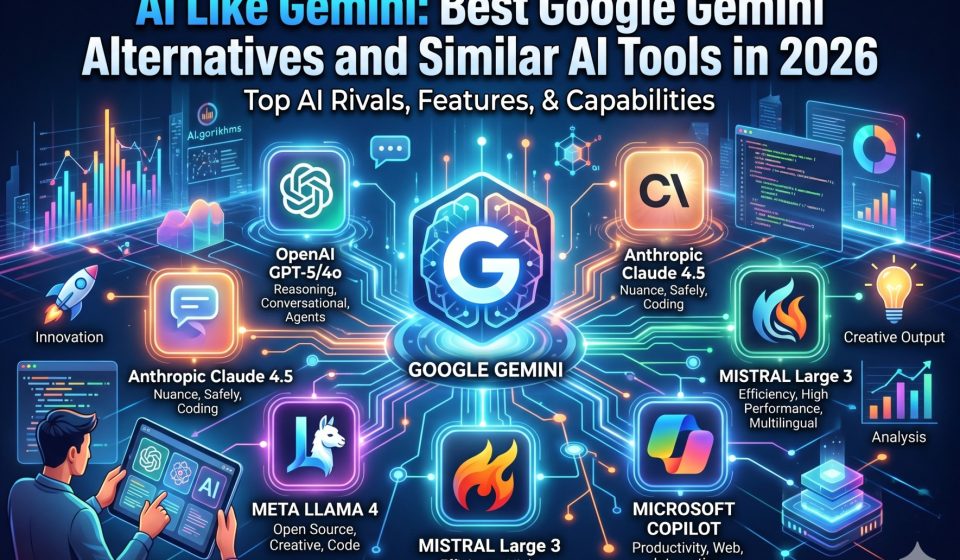

Google Gemini set a new benchmark when it launched by combining large language model reasoning with real-time web access and native Google Workspace integration. For millions of users it became the default AI assistant simply because it was already inside Gmail, Docs, and Drive.
But Gemini is not the only AI that operates at this level. A growing number of users are either looking for tools that work like Gemini, looking for platforms that outperform it on specific tasks, or actively planning to move their existing Gemini conversation history to a different assistant. This guide covers all three scenarios in full detail.
What Defines an AI That Works Like Gemini
When someone searches for AI like Gemini, they are typically looking for one or more of the following:
- A conversational AI with real-time information access
- A multimodal assistant that handles images, documents, and text together
- An AI with a long context window capable of holding large documents in memory
- An assistant that integrates with productivity tools like email, calendar, or cloud storage
- A platform with a free tier that does not require an API key for basic use
Gemini meets all five criteria to varying degrees. The platforms described below each match at least three, and some exceed Gemini on specific dimensions.
Claude by Anthropic: The Strongest Gemini Alternative for Deep Work
Claude is the AI most often recommended as a direct Gemini alternative for professionals who work with long documents, complex analysis, or multi-step instructions. Built by Anthropic, Claude 3 operates with a 200,000-token context window that comfortably holds entire research papers, legal contracts, or software codebases in a single session.
How Claude compares to Gemini:
- Context handling: Claude’s 200k window is more practically accessible than Gemini 1.5’s 1M token window for most users because it performs more consistently at high token counts
- Accuracy: Claude has lower hallucination rates on complex factual tasks, particularly in legal, medical, and technical domains
- Writing quality: Claude produces more natural-sounding long-form prose, making it the preferred tool for reports, essays, and professional documents
- Workspace integration: Claude does not natively connect to Google Workspace, which is Gemini’s primary advantage for Google-centric workflows
Users who want to bring their existing Gemini conversation threads into Claude without losing any context or message history can use the Gemini to Claude migration tool at gemini2claude.com, which runs entirely on the local device and sends no data to any third-party server.
If you have previously built up conversation history across ChatGPT and now want to evaluate Claude, the ChatGPT to Claude transfer tool at chatgpt2claude.com handles that migration with the same local-only approach.
ChatGPT: The Most Feature-Rich AI Similar to Gemini
ChatGPT from OpenAI is the platform most comparable to Gemini in terms of breadth. Both offer free tiers, both have paid plans with access to their most capable models, both support multimodal input, and both have invested heavily in third-party integrations.
Where ChatGPT outperforms Gemini:
- Custom GPTs: Users can build specialized assistants with specific instructions, uploaded knowledge bases, and tool access
- Plugin and tool ecosystem: The range of third-party integrations is broader than Gemini’s current offering
- Code Interpreter: Built-in Python execution for data analysis, chart generation, and file processing
- Community resources: A much larger library of prompts, tutorials, and specialized workflows exists for ChatGPT
Where Gemini outperforms ChatGPT:
- Google Workspace integration is native and seamless, not an add-on
- Real-time web access is included at every tier without requiring a separate setting
- Multimodal handling of images from Google Photos and diagrams from Google Drive is more fluid
For users currently on ChatGPT who want to explore whether Gemini fits their workflow better, transferring ChatGPT conversations to Gemini preserves the full thread structure and message history so you can pick up every conversation exactly where it ended.
Microsoft Copilot: AI Like Gemini for Microsoft 365 Users
Microsoft Copilot runs on GPT-4 infrastructure and is embedded directly into Word, Excel, Outlook, Teams, and PowerPoint. For users whose work lives inside Microsoft 365, Copilot offers the same kind of deep workspace integration that makes Gemini attractive to Google Workspace users.
Key similarities with Gemini:
- Both are embedded inside productivity suites rather than existing only as standalone chat applications
- Both can reference documents, emails, and calendar events from the connected workspace
- Both use retrieval-augmented generation to pull real content from the user’s existing data rather than relying purely on model training
Key differences:
- Copilot is limited to Microsoft 365 context by default, whereas Gemini also functions as a general-purpose AI outside the workspace
- Copilot does not have a meaningful free tier for enterprise features
- Gemini’s multimodal image reasoning is currently stronger than Copilot’s
Perplexity AI: Real-Time Research Similar to Gemini Search Capabilities
Perplexity AI is the closest match to Gemini’s real-time web access functionality. Every Perplexity response cites its sources with direct links, making it exceptionally useful for research, fact-checking, and staying current on fast-moving topics.
Where Perplexity is similar to Gemini:
- Both use real-time retrieval rather than relying only on static training data
- Both can answer questions about recent events, current prices, and live information
- Both present sources alongside responses for verification
Where Perplexity differs:
- It is a research tool first and a conversational assistant second
- Creative writing, long-form content generation, and complex coding tasks are not its strengths
- It does not integrate with productivity tools or cloud storage
For users who primarily need Gemini’s real-time web access feature and find other aspects of Gemini less useful, Perplexity is worth evaluating directly.
Meta AI: A Free Gemini-Like Assistant Inside Social Platforms
Meta AI is built on Meta’s Llama models and is embedded inside WhatsApp, Instagram, Messenger, and the Ray-Ban smart glasses platform. It is free, requires no separate account for existing Meta platform users, and handles general conversation, image generation, and basic research tasks.
Where Meta AI works like Gemini:
- Free access without a subscription
- Multimodal capabilities including image generation and analysis
- Real-time information access on the Llama 3 models
Where it falls short of Gemini:
- Instruction-following on complex, multi-step prompts is weaker
- No integration with productivity tools or document storage
- Context window and long-document handling are significantly behind Gemini and Claude
Meta AI is a reasonable Gemini alternative for casual use but is not competitive for professional, research, or technical workflows.
Grok by xAI: The Real-Time Social AI Similar to Gemini
Grok is xAI’s AI assistant, deeply integrated with the X platform (formerly Twitter). Its primary advantage is real-time access to X posts, trending topics, and social data, which no other major AI assistant provides natively.
How Grok compares to Gemini:
- Both offer real-time information access, but Grok’s strength is social and news data while Gemini’s is general web and Google properties
- Grok has a less developed ecosystem for productivity and document work
- The tone is more casual and less suited to formal professional tasks
For users whose work requires tracking social sentiment, trending conversations, or real-time news analysis, Grok is a meaningful Gemini alternative. For document work, research, or coding, Claude and ChatGPT remain stronger.
Feature Comparison: AI Tools That Work Like Gemini
| AI Platform | Real-Time Web | Long Context | Workspace Integration | Free Tier | Multimodal |
|---|---|---|---|---|---|
| Google Gemini Advanced | Yes | 1M tokens | Google Workspace | Yes (limited) | Yes |
| Claude 3 (Anthropic) | Via tools | 200k tokens | API-based | Yes (limited) | Yes |
| ChatGPT (GPT-4o) | Yes | 128k tokens | Limited | Yes (limited) | Yes |
| Microsoft Copilot | Yes | 128k tokens | Microsoft 365 | Limited | Yes |
| Perplexity AI | Yes | Moderate | None | Yes | Yes |
| Grok (xAI) | Yes (X data) | Moderate | None | Yes (limited) | Yes |
Why Users Switch Away From Gemini
Despite Gemini’s strengths, several patterns consistently drive users toward alternatives:
Context window performance in practice
Gemini 1.5’s advertised 1M token context is impressive on paper, but many users report inconsistent performance at very high token counts. Claude’s 200k window tends to perform more reliably at the upper range, making it the preferred choice for users who regularly work with entire codebases or book-length documents.
Conversation portability
Gemini does not offer a simple export-and-import workflow for moving conversation history to another platform. Users who have accumulated months of research threads, project discussions, or client context in Gemini find themselves effectively locked in. The best way to load a long Gemini conversation into Claude is through a local migration tool that preserves full structure without requiring manual reformatting.
Accuracy on nuanced tasks
For legal analysis, medical research, and technical writing where precision matters more than speed, Claude’s lower hallucination rate and stronger instruction-following make it the more reliable choice.
Independence from Google
Some users prefer to keep their AI assistant separate from their Google account for privacy reasons or to avoid data being used for model training within the Google ecosystem.
How to Move From Gemini to a Different AI Platform
If you have decided to move from Gemini to Claude, ChatGPT, or another platform, the critical step is preserving the conversation history you have built up. Manually copying and reformatting threads is both time-consuming and error-prone.
TransferLLM provides a dedicated desktop application specifically for switching from Gemini to Claude that handles the entire migration on your device. The tool:
- Reads your Gemini conversation history directly
- Converts formatting, code blocks, and message structure to Claude’s format
- Writes the converted conversations directly to your Claude account
- Never sends any data to TransferLLM’s servers at any point in the process
For users coming from ChatGPT rather than Gemini, the ChatGPT to Claude transfer tool follows the same local-processing approach. And for users who want to bring their ChatGPT history into Gemini specifically, chatgpt2gemini.com handles that migration with full context preservation.
The complete guide to transferring Gemini conversations to Claude on the TransferLLM blog walks through each step of the process in detail.
Choosing the Right Gemini Alternative for Your Workflow
The correct Gemini alternative depends entirely on why you are looking for one:
If you need better long-document handling: Claude is the clear choice. The 200k context window and consistent performance at high token counts make it the most practical tool for working with entire codebases, research papers, or contract archives in a single session.
If you want more third-party integrations: ChatGPT has the most mature plugin and tool ecosystem. The custom GPT builder also allows for highly specialized assistants that Gemini cannot match.
If you work inside Microsoft 365: Microsoft Copilot offers the same kind of deep integration that makes Gemini valuable for Google Workspace, but within the Microsoft ecosystem.
If you need cited, sourced research: Perplexity AI is the best tool for research that requires verifiable sources with every claim.
If you need real-time social and news data: Grok’s X integration makes it the only major AI with direct access to social media data streams.
Frequently Asked Questions
1. What is the best AI tool like Gemini available in 2026?
Claude by Anthropic is the strongest Gemini alternative for professional and research-intensive work, particularly for tasks involving long documents, complex reasoning, and high-accuracy output. ChatGPT is the most feature-rich alternative with the broadest ecosystem. The best choice depends on your specific workflow rather than any universal ranking.
2. Can I keep using Gemini while also using another AI tool?
Yes, and many professionals use multiple AI platforms for different tasks. The challenge is managing context across them. If you want your Gemini conversation history to be accessible inside Claude, the Gemini to Claude migration tool handles the transfer without any manual effort.
3. Is there a free AI tool that works like Gemini?
Claude, ChatGPT, Perplexity, and Grok all offer free tiers with meaningful capability. Gemini itself has a free tier. None of the free tiers provide full access to the most capable models, but all are usable for everyday tasks.
4. How do I transfer my Gemini conversations to Claude without losing context?
The gemini2claude.com desktop tool migrates your complete conversation history, including formatting, code blocks, and message structure, directly from your Google account to your Claude account. All processing happens locally on your device, and no data passes through any external server.
5. Does switching from Gemini to Claude mean losing my Google Workspace integration?
Yes. Claude does not natively connect to Gmail, Drive, or Docs the way Gemini does. However, Claude’s API integrates with many productivity tools, and for users who primarily want a more capable AI for analysis and writing rather than in-app document assistance, the tradeoff is worthwhile. Your existing Gemini threads can be migrated to Claude so you do not start from scratch