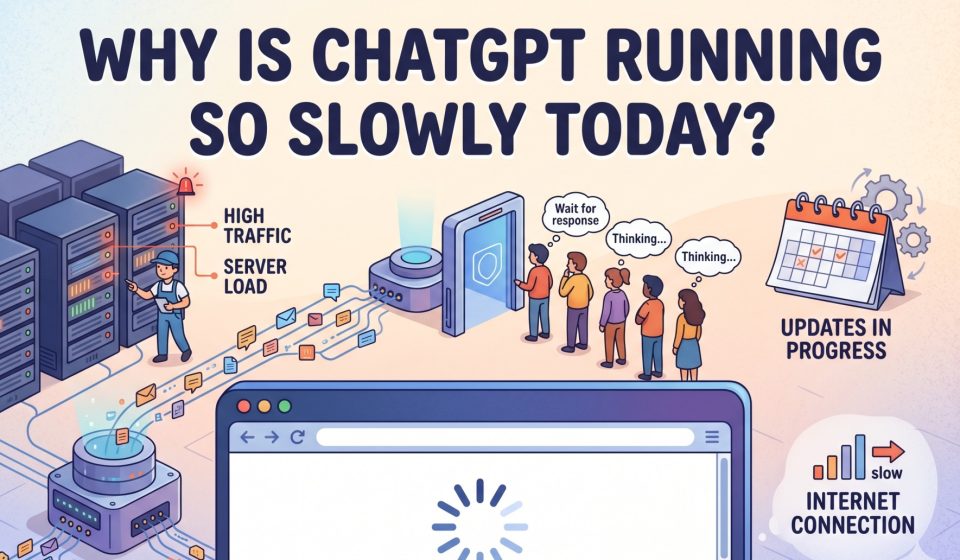

If you have landed here, chances are you are staring at a spinning loader, watching your ChatGPT response take forever to generate, or getting no response at all. You are not alone. ChatGPT slowness is one of the most frequently searched complaints among AI users in 2026, and the causes are more varied than most people realise.
This guide breaks down every reason ChatGPT might be running slowly for you right now and gives you clear paths forward, including how to switch platforms without losing a single conversation.
Is ChatGPT Actually Slow Right Now, or Is It Your Connection?
Before blaming OpenAI’s servers, it is worth ruling out the obvious. A slow ChatGPT session could be caused by:
- Your internet connection dropping packets or experiencing high latency
- A browser cache that has grown too large
- An outdated browser extension conflicting with the ChatGPT interface
- A VPN routing your traffic through a congested server
Run a quick speed test. If your internet looks healthy and other sites load normally, then the slowness is almost certainly on ChatGPT’s end.
The Real Reasons ChatGPT Is Running Slowly
1. Server Overload During Peak Hours
ChatGPT serves hundreds of millions of users globally. Peak usage windows typically mid-morning to early afternoon in US time zones, and business hours in Europe push OpenAI’s infrastructure to its limits. During these windows, response generation slows dramatically because the servers are handling more simultaneous requests than they were designed to process at that moment.
This is the single most common cause of ChatGPT slowness and it happens predictably. If you work in an afternoon time zone or need AI assistance during business hours in North America, you will encounter this regularly.
2. Too Many Concurrent Requests Hitting the API
OpenAI imposes rate limits on both free and paid accounts. When too many requests are processed at once either from your account or across the platform ChatGPT throttles response speed to manage load. This is especially relevant for users who run ChatGPT in multiple tabs or have API-connected tools pinging the model simultaneously.
If you have experienced the “too many requests” error alongside general slowness, this is the same underlying problem. You can read more about how concurrent request overload affects ChatGPT performance and what the smarter alternatives look like.
3. Model Complexity and Context Window Size
When ChatGPT has to process a very long conversation one with dozens of message exchanges, large pasted documents, or complex code it takes more time to generate each subsequent response. The model is re-reading your entire conversation context with every reply.
This is not a bug; it is a design characteristic of how large language models work. However, it does mean that if you have been running a very long research or coding session, your responses will get progressively slower as the conversation grows.
4. Ongoing Maintenance and Planned Downtime
OpenAI performs regular maintenance on its infrastructure. While they try to schedule these windows during low-traffic periods, they do not always announce them in advance. If ChatGPT is running slowly or partially unavailable, check the OpenAI status page to see if an incident is being investigated.
5. Geographic Routing and Data Center Distance
If you are accessing ChatGPT from a region where OpenAI does not have a nearby data centre, your requests travel physically longer distances before being processed. Users in South Asia, Southeast Asia, and parts of Africa frequently report higher latency for this reason. This is not something you can easily fix from your end without a VPN and even then, results vary.
6. Free Plan Limitations
ChatGPT’s free tier deprioritises traffic during high-demand periods. Paid subscribers get priority access to the model. If you are on the free plan, a slow ChatGPT experience is partly by design you are queued behind paying users when the system is under load.
7. Model Rollouts and A/B Testing
OpenAI frequently tests new model versions, interface changes, and backend improvements in production. During these rollouts, some users get routed to experimental infrastructure that may not yet be fully optimised. If ChatGPT suddenly feels slower after previously being fast, a rollout could be responsible.
How to Fix ChatGPT Slowness: Practical Steps
Clear your browser cache and cookies. Stale cached data can cause interface issues and slow loading times. Clear your cache for the ChatGPT domain specifically.
Disable browser extensions. Ad blockers, grammar tools, and productivity extensions sometimes conflict with the ChatGPT interface. Test in a clean browser profile or incognito mode.
Start a new conversation. If your current session has grown very long, starting fresh removes the context window burden and typically speeds up responses immediately.
Switch to the API instead of the web interface. If you are a developer or power user, the API often performs better during peak periods because it bypasses the web interface overhead.
Try a different browser. Some users report that ChatGPT performs better in Chrome than in Firefox or Safari, particularly on older hardware.
Use off-peak hours. If your workflow allows flexibility, ChatGPT is typically faster early in the morning (US time) or late at night when fewer users are active.
When a Workaround Is Not Enough: Considering a Platform Switch
If ChatGPT slowness is a recurring problem that is genuinely affecting your productivity, you may want to consider using Claude or Gemini for your work either as a primary tool or as a reliable backup when ChatGPT is underperforming.
Both Claude and Gemini have demonstrated strong performance during periods when ChatGPT is congested. They offer different strengths: Claude is particularly strong for long-form writing, reasoning, and nuanced instructions, while Gemini integrates tightly with Google Workspace.
The concern most people have about switching platforms is losing their conversation history. If you have months of research threads, project notes, or ongoing tasks living inside ChatGPT, starting over on a new platform feels like an unacceptable cost. That concern is legitimate but it is also solvable.
TransferLLM was built specifically to address this problem. It lets you move your complete ChatGPT conversation history to Claude or Gemini without manual copy-pasting, without losing message structure, and without losing the context that makes those conversations valuable.
Moving From ChatGPT to Claude When Performance Suffers
If Claude appeals to you as an alternative, the switch is straightforward. Transferring your ChatGPT conversations to Claude through TransferLLM takes minutes, not hours. You connect your accounts, select the chats you want to move, and the tool handles the formatting, structure, and import automatically.
Once your conversations are in Claude, you can continue exactly where you left off same context, same project thread, no rebuilding from scratch.
Moving From ChatGPT to Gemini for Google Workspace Integration
For users who live inside Google Docs, Sheets, and Gmail, Gemini offers native integration that ChatGPT cannot match. If your slowness frustration coincides with needing tighter Google Workspace connectivity, this might be the right moment to make the move.
The ChatGPT to Gemini transfer process through TransferLLM preserves your conversation structure and delivers your chats into Gemini with clean formatting, ready to continue. You can read a detailed walkthrough of how this works in the step-by-step guide to migrating from ChatGPT to Gemini.
Comparing ChatGPT Performance Against Claude and Gemini in 2026
Speed is not the only variable when choosing an AI platform. Here is a practical comparison relevant to the performance question:
ChatGPT (GPT-4o / GPT-4.5): Most capable for general-purpose tasks, widest plugin ecosystem, but prone to congestion during peak hours. Free tier gets significantly slower than paid tier during busy periods.
Claude (Anthropic): Generally fast response times with strong consistency. Particularly well-suited for extended analysis, careful reasoning, and instruction-following. Less congestion relative to user base size.
Gemini (Google): Benefits from Google’s infrastructure scale. Deep integration with Google services. Performs well for users already inside the Google ecosystem.
For a detailed comparison of how these platforms stack up overall, the complete 2026 guide to ChatGPT vs Gemini covers the key differences in depth.
Frequently Asked Questions
Why is ChatGPT so slow only at certain times of day?
This is the peak hour effect described above. ChatGPT usage concentrates heavily during North American and European business hours. If you consistently hit slowness between 9 AM and 2 PM US Eastern time, server load is almost certainly the cause.
Does paying for ChatGPT Plus actually fix the slowness?
It helps, but does not eliminate the problem entirely. Plus subscribers get priority access, which means faster responses during moderate congestion. During severe overload events, even Plus users experience degraded performance.
Can I use ChatGPT’s app instead of the browser to get better speed?
Sometimes. The mobile app and desktop app can route requests differently than the browser interface. Some users report marginally better performance on the app during browser-based slowness periods, but results are inconsistent.
Will clearing ChatGPT’s memory help with slow responses?
Clearing stored memory does not directly affect response speed. However, starting a new conversation thread does because the model no longer has to process the full context of a long session with each response.
Is there a way to check if ChatGPT is down before spending time troubleshooting?
Yes. Check status.openai.com for real-time incident reports. Third-party monitoring sites like Downdetector also aggregate user reports if you want a broader picture of how widespread an issue is.
The Bottom Line
ChatGPT slowness in 2026 is a real and recurring issue driven primarily by server load during peak hours, rate limiting, long context windows, and geographic routing. Most individual fixes offer only partial relief because the core bottleneck is on OpenAI’s infrastructure side.
The most durable solution for users whose productivity genuinely depends on fast, reliable AI access is either timing your usage around peak periods or maintaining the ability to work across multiple platforms. Knowing that you can move your entire ChatGPT conversation history to Claude or Gemini instantly removes the switching cost and gives you genuine flexibility.
You do not have to start over to start fresh. TransferLLM makes sure of that.
Related reading from the TransferLLM blog: