

Introduction
AI platforms are evolving fast. Many users now work across multiple tools, such as Google Gemini, Claude, ChatGPT, and more.
Switching platforms is common. But moving your work safely? That part trips people up.
Your chat history holds valuable context. Research threads, creative drafts, workflow notes, losing that data wastes time and effort.
This guide covers exactly how to transfer Gemini conversations to Claude. You will learn the manual method, the automated approach, the best tools available, and practical tips to keep your data safe throughout the process.
What Does Gemini to Claude Conversations Transfer Mean?
At its core, it means moving your chat history from Google Gemini over to Anthropic’s Claude platform.
Think of it like switching notebooks. You want the same notes, the same context, just in a new place.
Users migrate chats for several reasons. Some need to switch AI providers at work. Others want Claude’s reasoning style for a specific project. Many users want to reuse research they have already done in Gemini.
Common scenarios include:
- Research continuity: You have long research threads in Gemini and want to continue them in Claude.
- Content reuse: You drafted blog outlines or scripts in Gemini and need them in Claude for editing.
- Workflow shifts: Your team is standardizing on one AI platform and needs to move AI chat export and import data across.
The goal is simple: bring your conversations over without losing the structure, context, or meaning.
Challenges in Transferring Gemini Conversations
Transferring AI chats between platforms sounds simple. It rarely is.
No direct native integration exists: Gemini and Claude are separate products built by different companies. There is no built-in “send to Claude” button.
Formatting can break easily: When you copy a long conversation manually, bullet points collapse, code blocks lose indentation, and responses run together without clear separation.
Context gets lost: A raw text dump looks nothing like a structured conversation. Claude needs proper formatting to understand who said what.
Manual copy-paste is slow: For a 10-message chat, it works. For 100 messages or more, it becomes a real problem.
Privacy is a real concern: Moving data from one platform to another, especially if it contains client details, internal research, or personal information, requires careful handling.
These challenges are exactly why people look beyond manual methods when they want to migrate Gemini chat history at scale.
Manual vs. Automated Transfer Methods
Manual Transfer
The manual method is exactly what it sounds like. You open Gemini, highlight a conversation, copy it, and paste it somewhere in Claude.
Pros: No tools required. Zero setup. Works for small, one-off chats.
Cons: It is time-consuming. Formatting rarely survives the copy. You can easily miss messages or mix up the order. For bulk data, this approach simply does not scale.
Manual transfer works when you have a short, simple thread with no complex formatting. For anything longer or more structured, it causes more problems than it solves.
Automated Transfer
Automated tools handle the heavy lifting. They read your Gemini data, reformat it correctly, and prepare it for import into Claude.
Why it works better:
- The tool preserves conversation structure automatically.
- Speaker turns stay labeled and in order.
- Formatting code, lists, and headers survives the process.
- You can move conversations from Gemini to Claude in bulk without touching each one manually.
Automated transfer is faster, more reliable, and far less error-prone. For professionals and teams handling large volumes of AI chat data, it is the only practical choice.
Best Tools for Gemini to Claude Conversations Transfer
Gemini2Claude
gemini2claude is purpose-built for one job: moving conversations from Gemini to Claude.
It handles the format differences between the two platforms cleanly. The tool maps Gemini’s conversation structure directly to a Claude-compatible format.
Key advantages:
- Simple interface with minimal setup
- Preserves conversation flow and speaker labels
- Designed specifically for AI chat export and import between these two platforms
- Good choice for individual users and solo professionals
If you need a focused tool to transfer Gemini conversations to Claude quickly, gemini2claude is a strong starting point.
TransferLLM
TransferLLM takes a broader approach. It supports multiple AI platforms, not just Gemini and Claude.
It works well for organizations and teams that use several AI tools at once. The platform is built with security and scalability in mind.
Key advantages:
- Supports multi-platform AI transfer across Gemini, Claude, ChatGPT, and others
- Secure data handling with enterprise-grade options
- Scalable for teams managing large conversation archives
- Reliable structure preservation across complex, long-form chats
TransferLLM is the right choice for companies that need a secure AI data transfer solution at scale.
Step-by-Step Guide to Transfer Gemini Conversations to Claude
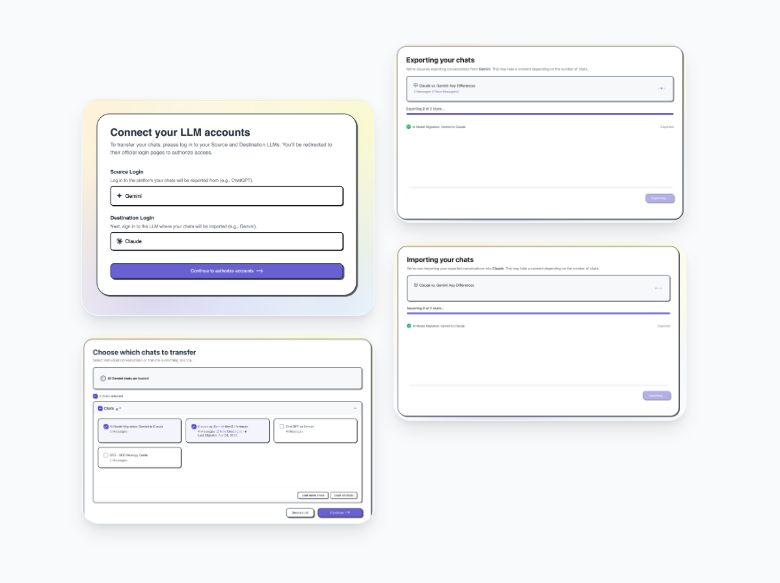
Step 1: Export Gemini Conversations
Start in Gemini. Open the conversation you want to transfer.
Use Gemini’s export or download option if available in your account settings. If not, copy the chat content directly. Save it as a text or JSON file for cleaner processing.
Label each file clearly. You will want to track which conversations you have already transferred.
Step 2: Choose a Transfer Tool
Decide between gemini2claude and TransferLLM based on your needs.
Individual user with a few chats? gemini2claude is quick and straightforward. Team migrating Gemini chat history in bulk? TransferLLM handles scale and security better.
Download or sign up for your chosen tool before moving to the next step.
Step 3: Upload and Process Data
Upload your exported Gemini file to the tool.
The tool reads the raw data and reformats it automatically. It separates user messages from AI responses, restores labels, and fixes broken formatting.
This step takes seconds for small files and a few minutes for large archives. You do not need to edit anything manually.
Step 4: Import into Claude
Once the tool processes your data, download the output file.
Open Claude. Paste the conversation or upload the file depending on the format Claude accepts. Check that speaker labels appear correctly and that the conversation flows in the right order.
Spot-check a few key messages. Make sure the context transferred cleanly. If anything looks off, re-run the export from the original file.
Best Practices for Safe Chat Transfer
Check data privacy first: Before you move any conversation, review what it contains. Remove sensitive client names, internal project details, or personal data before you transfer.
Avoid sharing confidential chats: Not every conversation should move between platforms. Use your judgment about what is safe to migrate.
Use trusted tools only: Stick to well-reviewed tools like Gemini2Claude and TransferLLM. Random, unverified tools can expose your data or corrupt your files.
Always back up before you start: Save a copy of your original Gemini data before running any transfer process. If something breaks, you will want that backup.
Benefits of Using Tools for AI Chat Migration
The right tool makes the whole process easier and safer. Here is what you gain:
Saves time: Automated tools process dozens of conversations in the time it takes to manually copy one.
Keeps full context: The conversation structure stays intact. Claude reads the history correctly instead of guessing at a wall of unformatted text.
Reduces human errors: No missed messages. No mixed-up order. No accidentally deleted content.
Improves productivity: You get back to actual work faster. The admin side of switching platforms stops eating into your day.
Common Mistakes to Avoid
Using random tools without verification: Free tools with no reviews or documentation are a risk. Your data may end up stored, leaked, or corrupted.
Ignoring formatting issues: A successful transfer is not just about getting text into Claude. The format needs to be correct for Claude to process it usefully.
Skipping the backup step: This is the most common mistake. Always save the original before you run any transfer process.
Sharing confidential chats with third-party tools: Even trusted tools have terms of service. Read them before uploading sensitive information.
People Also Ask (FAQs)
How can I transfer Gemini conversations to Claude?
Use a dedicated tool like gemini2claude or TransferLLM. Export your Gemini chat data, run it through the tool, and import the output into Claude. The tool handles reformatting automatically.
Is it safe to transfer AI chat data?
Yes, if you use secure, well-reviewed tools. Avoid unknown or unverified platforms. Always remove sensitive information before you transfer any conversation.
Can I transfer chats without losing context?
Yes. Automated tools preserve the conversation structure, speaker labels, and formatting. Manual copy-paste often loses context. Tools built for AI chat export and import keep everything intact.
Is manual copy-paste a good option?
For one or two short conversations, it works fine. For bulk data or complex threads, it is not recommended. Formatting breaks, messages get lost, and the process takes far too long.
Which is the best tool for Gemini to Claude conversations transfer?
Gemini2Claude is the top choice for individuals who need a simple, focused solution. TransferLLM is better for teams and organizations that need scale and advanced security features.
Conclusion
Transferring your AI chat history does not have to be a headache. The key is using the right method for the right situation.
Manual copy-paste works for a quick one-off task. For anything serious, research archives, team workflows, or bulk migration automated tools are the smarter path.
Tools like gemini2claude and TransferLLM exist precisely because this problem is real and common. They make the process faster, safer, and far more reliable than doing it by hand.
Protect your data. Back up before you start. Use trusted tools. And move your conversations from Gemini to Claude with confidence.
👉 Ready to move your conversations? Use Gemini2Claude or TransferLLM to transfer your Gemini conversations to Claude today and save hours of manual work.