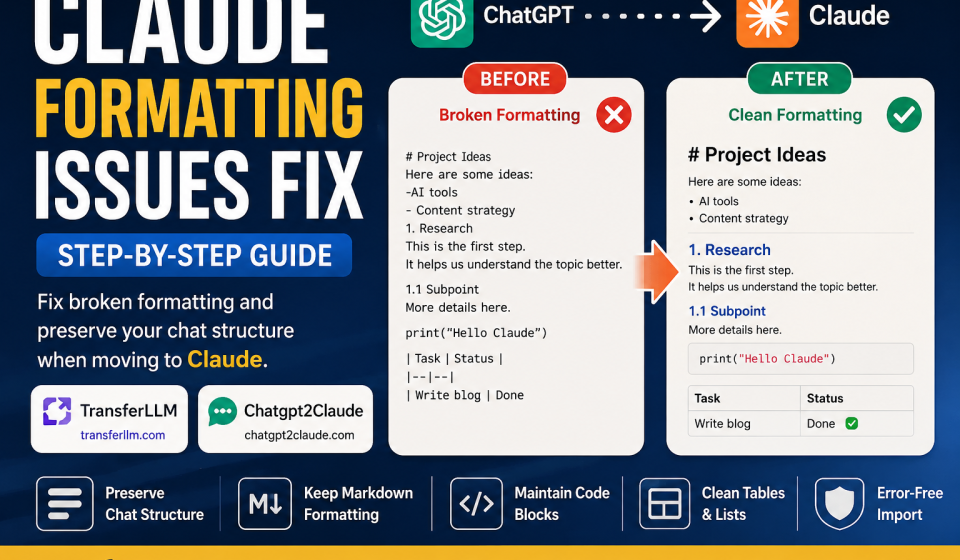

Formatting matters more than most people think. When you move a conversation between AI platforms, messy output breaks your focus and wastes time. You lose context. You lose structure. You lose the point.
Users moving chats from ChatGPT to Claude know this frustration well. Headers disappear. Code blocks collapse. Bullet points scatter across the screen.
That is where tools like TransferLLM and ChatGPT2Claude come in. They handle Claude formatting issues so you do not have to fix things manually every single time.
What Are Claude Formatting Issues?
Claude formatting issues are errors that appear when imported text does not display correctly inside Claude. They affect how content looks and how easy it is to read.
Here are the most common ones:
- Broken paragraphs: Text merges into one giant wall with no spacing.
- Missing headings: H1, H2, and H3 tags vanish completely after import.
- Improper markdown rendering: Bold, italic, and code formatting shows as raw symbols.
- Chat structure distortion: Messages lose their order or speaker labels.
- Code block formatting errors: Code runs inline instead of inside a formatted block.
- Bullet list alignment problems: Lists appear flat or merge into plain sentences.
These problems hurt readability. They also break workflow. When Claude cannot read the structure of a conversation clearly, its responses lose accuracy. Good formatting is not just visual, it shapes how well the AI understands your input.
Why Claude Formatting Issues Happen During Chat Transfers
Most Claude formatting issues come down to one core problem: platforms do not speak the same language.
Incompatible export formats are the top cause. ChatGPT exports JSON or plain text by default. Claude works best with clean markdown.
Markdown conversion problems happen when symbols like #, **, and ` do not carry over properly. They either disappear or render as literal characters.
Unsupported symbols or spacing cause gaps in structure. Special characters and em-dashes often get stripped or replaced.
Large conversation handling is another weak point. Very long chats get truncated or shuffled during export.
Copy-paste formatting corruption is the simplest cause. Pasting directly from a browser strips markdown and adds unwanted line breaks.
ChatGPT exports are built for ChatGPT. They are not optimized for Claude imports. Each platform uses slightly different formatting standards, and that gap causes most of the issues users face.
Common Claude Formatting Problems Users Face
Broken Headings and Text Alignment
You paste a chat. The H2 heading becomes bold plain text. The H3 disappears entirely.
Alignment breaks too. Left-aligned content drifts. Indented sections flatten out. The result looks nothing like the original.
Example: ## Summary becomes ## Summary as raw text, not a rendered heading.
Missing Code Blocks
Code snippets lose their formatting block. They merge into regular paragraph text. This makes code impossible to read and easy to misread.
Example: A Python function that should sit inside a “`python “` block appears as one long unformatted string.
Paragraph Spacing Errors
Single line breaks become double breaks. Double breaks disappear. Paragraphs that once had clean spacing pile on top of each other.
This is one of the most common Claude formatting issues beginners run into.
Chat Structure Getting Mixed
In long conversations, user messages and AI responses can swap positions. The back-and-forth structure collapses. Context becomes impossible to follow.
Markdown Syntax Not Working Properly
Stars appear as stars. Backticks appear as backticks. Bold and italic text renders as raw markdown rather than styled output.
This happens most often when content comes from a plain text export or a browser copy-paste.
Step-by-Step Claude Formatting Issues Fix
Step 1: Export Chat Properly
Always export using a markdown-friendly format. Avoid copying text directly from the ChatGPT interface.
Look for export options that give you .md files or markdown-structured JSON. Plain text exports strip most formatting by default.
Step 2: Clean the Chat Structure
Before importing, open the file and review it. Remove stray symbols like >>>, extra dashes, or duplicate line breaks.
Check that headings are consistent. Make sure spacing between sections is uniform. A clean structure prevents most rendering errors.
Step 3: Verify Markdown Formatting
Test your file in a markdown previewer before uploading. Tools like Dillinger or StackEdit show how content will render.
Check every code block. Confirm lists are using – or * consistently. Look for broken table rows if your chat includes any.
Step 4: Use a Formatting-Friendly Tool
This is where dedicated tools save significant time.
TransferLLM preserves your markdown structure during transfer. It keeps headings, code blocks, and bullet lists intact. It also handles large conversations without truncating content.
Chatgpt2Claude focuses on speed and simplicity. It converts your ChatGPT chats into Claude-ready format with a beginner-friendly interface. Formatting errors are caught automatically before the transfer completes.
Both tools remove the manual cleanup step entirely.
Step 5: Re-Import into Claude
Before you finalize the import, do one last review. Scroll through the content inside Claude. Check headings, code blocks, and paragraph spacing.
If something looks off, go back to step two. A quick structure check saves much more time than fixing errors after the fact.
Best Tools to Fix Claude Formatting Issues
Tool 1: TransferLLM
TransferLLM is built for users who move AI conversations regularly. It handles the heavy lifting so formatting stays clean from start to finish.
Key features:
- Preserves full markdown structure
- Maintains original chat order and speaker labels
- Supports very large conversation exports
- Offers simple, one-click export options
It works well for developers, writers, and researchers who rely on accurate context transfers.
Tool 2: Chatgpt2Claude
ChatGPT2Claude is a fast, lightweight option for users who want a smooth transfer without technical setup.
Key features:
- Quick AI chat conversion with minimal steps
- Cleaner formatting output with fewer manual corrections
- Simple interface built for non-technical users
It handles common Claude formatting issues automatically, making it a solid pick for everyday use.
How to Preserve Chat Structure While Moving to Claude
Chat structure is the backbone of any AI conversation. Losing it means losing context. Here is how to keep it intact:
- Use markdown format for all exports. It is the most compatible option for Claude.
- Keep heading styles consistent. Do not mix H1 and H3 without a proper hierarchy.
- Avoid unsupported formatting like HTML tags, inline styles, or RTF characters.
- Split extremely large chats. Break them into sections of 50 to 100 exchanges for cleaner imports.
- Preview before importing. Always check the rendered output before the final upload.
Small habits like these prevent most Claude formatting issues before they start.
Tips to Avoid Claude Formatting Issues in the Future
Prevention is faster than fixing. These habits keep your formatting clean:
- Always export in markdown. Never rely on plain text or browser copy-paste.
- Use formatting-compatible tools like TransferLLM or Chatgpt2Claude every time.
- Avoid copying directly from browsers. Browser formatting adds hidden characters that break structure.
- Keep chats organized while you write them. Clean input leads to clean exports.
- Back up original conversations. Always save the source file before making any edits.
Why Formatting Matters for AI Workflows
Good formatting is not just about aesthetics. It has real impact on how AI tools perform and how teams collaborate.
Better readability means faster comprehension. You spend less time decoding text and more time acting on it.
Easier editing follows naturally. Well-structured content is faster to revise, summarize, and repurpose.
Accurate AI context understanding depends on structure. Claude reads formatting cues to understand relationships between ideas. Broken structure leads to weaker responses.
Improved collaboration happens when shared documents are clean and consistent. Teams work faster with content that does not require cleanup.
Professional documentation starts with proper formatting. Whether you are building a knowledge base or writing a report, structure signals quality.
FAQs About Claude Formatting Issues
How do I fix Claude formatting issues?
Export your chat in markdown format, clean the structure manually or with a tool, then re-import into Claude. Tools like TransferLLM and Chatgpt2Claude automate most of this process.
Why does Claude break markdown formatting?
Claude breaks markdown when the imported file uses incompatible syntax, plain text format, or has structural errors from copy-paste transfers.
How can I preserve chat structure in Claude?
Use markdown-compatible exports, keep heading levels consistent, split large chats, and preview content before importing.
What is the best tool for ChatGPT to Claude transfer?
TransferLLM and Chatgpt2Claude are the top options. Both preserve formatting and handle structural errors automatically.
Why are my code blocks broken in Claude?
Code blocks break when the export format strips backtick syntax. Always export in markdown and verify code blocks in a previewer before importing.
Can markdown formatting be preserved during AI chat export?
Yes. Use a markdown export option or a dedicated transfer tool. Plain text exports do not preserve markdown.
Does TransferLLM keep formatting intact?
Yes. TransferLLM is specifically built to preserve markdown, headings, code blocks, and chat structure during transfers.
How do I transfer ChatGPT chats to Claude without formatting errors?
Export in markdown, clean the file structure, and use TransferLLM or Chatgpt2Claude to handle the conversion cleanly.
Final Thoughts
Claude formatting issues are common, but they are also fixable. The key is knowing where they come from and using the right process to prevent them.
Clean formatting protects your workflow. It keeps context intact, makes editing faster, and helps Claude give better responses.
You do not have to fix these problems manually every time. Tools built for this exact task exist and work well.
👉 Fix Claude formatting issues instantly with TransferLLM and Chatgpt2Claude. Keep your chat structure clean, readable, and import-ready from day one.