
If you use multiple AI assistants every week, you’ve likely run into the same problem.
A great conversation starts in ChatGPT. Later, you need it in Claude for writing or Gemini for research. Instead of continuing your work, you’re forced to copy prompts, paste responses, and rebuild context from scratch.
The best AI chat transfer tool solves that problem. It helps you move conversations between AI platforms while keeping your prompts, responses, and context organized. Whether you’re a marketer, developer, writer, researcher, or business owner, using the right tool can save hours every week.
In this guide, we’ll compare the best AI chat transfer tool options available in 2026. You’ll learn their features, pricing, advantages, limitations, and which solution fits your workflow.
An AI chat transfer tool lets you move conversations between AI platforms like ChatGPT, Claude, and Gemini while preserving prompts and context. The best tools reduce manual copy-pasting, organize chat history, and make switching between AI models faster and more efficient for individuals and teams.
Quick Navigation
- Why AI Chat Transfer Matters in 2026
- Best AI Chat Transfer Tools Compared
- Detailed Review of Each Tool
- Which Tool Should You Choose?
- Frequently Asked Questions
- Get More from Your AI Workflow
Why an AI Chat Transfer Tool Matters More Than Ever
Artificial intelligence has changed how people work.
Instead of relying on one chatbot, professionals now use several AI models for different tasks.
For example:
- ChatGPT for brainstorming
- Claude for long-form writing
- Gemini for research
- Other AI models for coding, automation, and data analysis
While this approach delivers better results, it creates another challenge.
Your conversations become scattered across multiple platforms.
That means:
- Important prompts get lost.
- Previous context disappears.
- Teams repeat the same work.
- Valuable conversations become difficult to find.
For professionals who use AI every day, this isn’t just inconvenient—it costs time and productivity.
That’s why an AI chat transfer tool has become an essential part of a modern AI workflow.
Instead of rebuilding conversations manually, you can continue where you left off regardless of which AI platform you’re using.
What Makes a Great AI Chat Transfer Tool?
Not every tool offers the same capabilities.
Some only export conversations.
Others simply organize chats inside one platform.
The best solutions do much more.
A quality AI chat transfer tool should include:
- Cross-platform conversation transfer
- Context preservation
- Multiple export formats
- Searchable chat history
- Secure data handling
- Easy setup without technical knowledge
- Fast transfer speeds
- Support for multiple AI platforms
If a tool lacks these features, you’ll probably end up copying and pasting conversations anyway.
Common Problems Users Face Without a Chat Transfer Tool
Many people underestimate how much time they lose every week.
Without a dedicated transfer solution, users often experience:
- Rewriting the same prompts repeatedly
- Losing important conversation history
- Breaking AI context between sessions
- Managing dozens of browser tabs
- Searching through hundreds of old chats
- Switching accounts multiple times every day
These problems become even bigger for agencies, freelancers, developers, and content teams working with multiple AI models.
An AI chat transfer tool eliminates most of these repetitive tasks.
Best AI Chat Transfer Tool Comparison (2026)
Choosing the right tool depends on how you use AI every day.
Some solutions focus on exporting conversations.
Others help organize prompts.
Only a few are designed specifically for transferring conversations between different AI platforms.
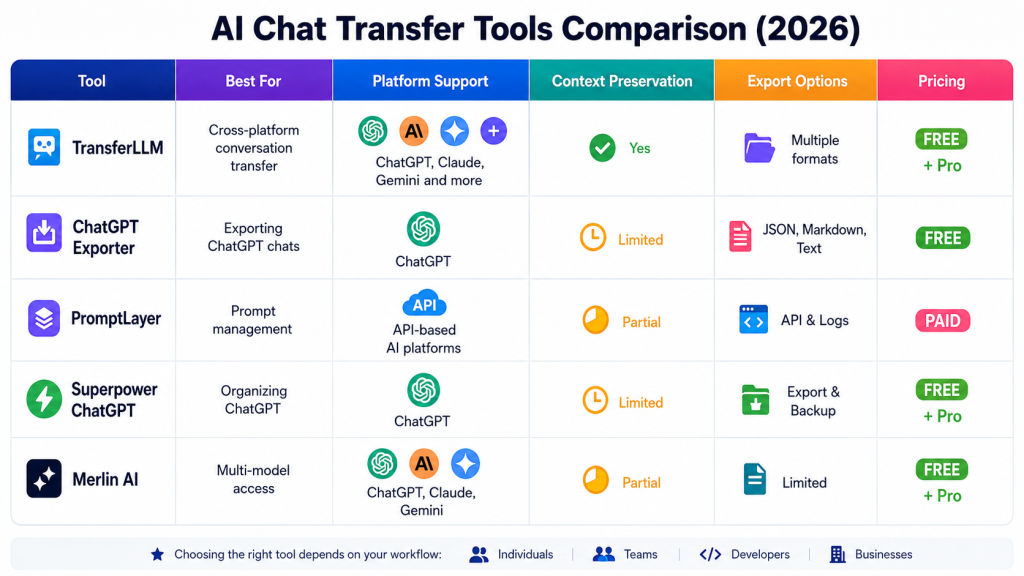
The table below compares the most popular options available today.
| Tool | Best For | Platform Support | Context Preservation | Export Options | Pricing |
| TransferLLM | Cross-platform conversation transfer | ChatGPT, Claude, Gemini and more | Yes | Multiple formats | Free + Pro |
| ChatGPT Exporter | Exporting ChatGPT chats | ChatGPT | Limited | JSON, Markdown, Text | Free |
| PromptLayer | Prompt management | API-based AI platforms | Partial | API & Logs | Paid |
| Superpower ChatGPT | Organizing ChatGPT | ChatGPT | Limited | Export & Backup | Free + Pro |
| Merlin AI | Multi-model access | ChatGPT, Claude, Gemini | Partial | Limited | Free + Pro |
Feature Comparison That Actually Matters
Most comparison articles focus on long feature lists.
In reality, only a handful of features determine whether a tool improves your workflow.
Here’s what matters most.
1. Cross-Platform Compatibility
Many tools only support one AI platform.
If you regularly switch between ChatGPT, Claude, and Gemini, compatibility becomes the first thing to check.
A dedicated AI chat transfer tool should work across multiple platforms instead of locking you into one ecosystem.
2. Context Preservation
This is the feature many users overlook.
Copying text is easy.
Keeping conversation history intact is much harder.
Without context, AI responses become less accurate because the model loses the previous discussion.
The best transfer tools preserve the entire conversation instead of exporting isolated messages.
3. Speed
Nobody wants another complicated workflow.
A good tool should move conversations in minutes—not hours.
Look for simple dashboards, one-click exports, and straightforward transfer options.
4. Security and Privacy
Your AI conversations may contain sensitive information.
Before connecting any third-party service, check whether it offers:
- Secure authentication
- Data encryption
- Clear privacy policies
- User-controlled exports
- Account management options
Security should never be an afterthought.
Expert Tip: Think Beyond Exporting
Many users assume exporting a conversation solves the problem.
It doesn’t.
An exported file still needs to be imported, organized, and searched later.
A true AI chat transfer tool focuses on maintaining workflow continuity—not just creating backup files.
That’s an important distinction when comparing different solutions.
What We’ll Cover Next
Now that you’ve seen the comparison, it’s time to look at each tool individually.
We’ll examine:
- Core features
- Advantages
- Limitations
- Best use cases
- Pricing
- Who should use it
By the end of this guide, you’ll know exactly which solution fits your workflow.
Detailed Review of the Best AI Chat Transfer Tools
Not every tool solves the same problem.
Some help you export conversations. Others organize prompts or provide access to multiple AI models. If your goal is to move conversations between platforms without rebuilding context, you’ll need to look beyond feature lists.
Below is a detailed breakdown of the top tools available today.
1. TransferLLM: Best Overall AI Chat Transfer Tool
If your workflow depends on multiple AI platforms, TransferLLM is designed for exactly that purpose.
Unlike browser extensions that simply export text files, TransferLLM focuses on transferring complete conversations while keeping the original context intact. This makes it easier to continue projects across different AI assistants without repeating previous prompts.
For professionals who switch between ChatGPT, Claude, and Gemini every day, this workflow can save significant time.
Key Features
- Cross-platform conversation transfers
- Context preservation during transfers
- Centralized conversation dashboard
- Searchable chat history
- Multiple export formats
- Cloud-based access
- User-friendly interface
Pros
- Supports multiple AI platforms
- Keeps conversation context organized
- Easy to learn
- Suitable for individuals and teams
- Reduces repetitive copy-and-paste work
Cons
- Some advanced capabilities may require a paid plan.
- Platform support may expand over time, so available integrations can change.
Best For
- Content creators
- SEO professionals
- Marketing agencies
- Developers
- Researchers
- AI power users
Expert Insight
Many users focus on transferring prompts.
The real productivity gain comes from transferring the entire conversation history.
When AI remembers previous instructions, responses become more accurate and consistent. That’s one of the biggest advantages a dedicated Best AI chat transfer tool can provide.
2. ChatGPT Exporter: Best Free Export Solution
If you only use ChatGPT and want local backups, ChatGPT Exporter is a simple solution.
It’s available as a browser extension and lets you download conversations in several common formats.
Installation takes only a few minutes, making it a good option for casual users.
Key Features
- Export conversations
- JSON support
- Markdown export
- Plain text export
- Quick installation
- Lightweight extension
Pros
- Completely free
- Very easy to use
- Fast exports
- Useful for local backups
Cons
- ChatGPT only
- No direct cross-platform transfers
- Limited workflow management
- Doesn’t preserve conversations across AI ecosystems
Best For
- Students
- Bloggers
- Writers
- Users wanting offline backups
Expert Insight
Exporting conversations is useful for archiving.
It doesn’t automatically make conversations reusable on another AI platform.
That’s an important difference between an exporter and a dedicated best AI chat transfer tool.
3. PromptLayer: Best for Developers and AI Teams
PromptLayer was built with developers in mind.
Instead of focusing on conversation transfers, it tracks prompts, records responses, and helps teams monitor AI interactions through API integrations.
For organizations building AI-powered applications, visibility into prompts can be extremely valuable.
Key Features
- Prompt logging
- Response tracking
- API integrations
- Team collaboration
- Prompt history
- Analytics dashboard
Pros
- Excellent prompt management
- Team collaboration tools
- Version history
- Developer-friendly
- Useful analytics
Cons
- Learning curve for beginners
- API knowledge may be required
- Not designed primarily for consumer chat transfers
Best For
- Software teams
- AI developers
- SaaS companies
- Engineering teams
Expert Insight
Prompt management and conversation transfer serve different purposes.
4. Superpower ChatGPT: Best ChatGPT Productivity Extension
Superpower ChatGPT extends ChatGPT with productivity features that many users wish existed natively.
Instead of changing how ChatGPT works, it improves organization.
Users can sort conversations into folders, manage prompt libraries, and create backups more efficiently.
Key Features
- Folder organization
- Prompt library
- Search improvements
- Chat backups
- Export tools
- Productivity enhancements
Pros
- Improves ChatGPT workflow
- Easy installation
- Better conversation management
- Helpful search features
- Prompt organization
Cons
- Limited to ChatGPT
- No complete cross-platform transfers
- Doesn’t synchronize conversations with other AI models
Best For
- Daily ChatGPT users
- Prompt engineers
- Writers
- Productivity enthusiasts
Expert Insight
If ChatGPT is your primary workspace, this extension can make organization much easier.
5. Merlin AI: Best for Accessing Multiple AI Models
Merlin AI takes a different approach.
Instead of moving conversations between platforms, it brings several AI models into one interface.
This reduces browser tab switching and makes comparing AI responses much faster.
It’s particularly useful when users want quick answers from different models.
Key Features
- Access to multiple AI models
- Browser extension
- AI writing assistance
- Summarization tools
- Productivity features
- Multiple integrations
Pros
- Convenient interface
- Supports several AI models
- Easy browser integration
- Useful writing features
Cons
- Limited conversation transfer
- Workflow differs from dedicated migration tools
- Context portability depends on available features
Best For
- Researchers
- Students
- Digital marketers
- Business professionals
Expert Insight
Having multiple AI models in one dashboard is convenient.
It isn’t the same as transferring complete conversations with preserved context.
Things Most Comparison Articles Don’t Mention
Many reviews focus on feature counts.
In practice, workflow efficiency depends on a few overlooked factors.
Searchability
Can you quickly find an old conversation months later?
Without searchable history, saved chats lose much of their value.
Conversation Continuity
Some tools export conversations as static files.
Others help maintain an active workflow where conversations remain organized and accessible.
Learning Curve
Developers may appreciate API-based tools.
Most professionals prefer solutions that work without technical setup.
Choosing software that matches your experience level often improves adoption.
Future Compatibility
AI platforms evolve quickly.
Selecting tools that actively support multiple models may reduce future migration challenges as new platforms emerge.
Which AI Chat Transfer Tool Is Right for You?
Your ideal choice depends on how you work.
Choose ChatGPT Exporter if you simply need free backups of ChatGPT conversations.
Choose PromptLayer if your team manages prompts, APIs, and AI development projects.
Choose Superpower ChatGPT if your entire workflow happens inside ChatGPT.
Choose Merlin AI if you frequently compare responses from multiple AI models in one interface.
Choose TransferLLM if your priority is moving conversations across platforms while keeping projects organized and reducing repetitive manual work.
For professionals using AI every day, reducing friction often matters more than adding new features.
The right workflow can save hours every week.
Choose the Right AI Chat Transfer Tool for Your Workflow
The best tool isn’t necessarily the one with the most features. It’s the one that fits how you work every day.
If your primary goal is creating local backups, a simple exporter may be enough.
If you’re managing AI prompts across development projects, prompt management software makes more sense.
But if you regularly switch between ChatGPT, Claude, Gemini, and other AI assistants, you’ll benefit most from a dedicated best AI chat transfer tool that keeps conversations organized and easy to continue.
The more AI platforms you use, the more valuable seamless conversation transfers become.
Quick Recommendations
| Your Goal | Recommended Tool |
| Export ChatGPT conversations | ChatGPT Exporter |
| Organize ChatGPT chats | Superpower ChatGPT |
| Manage prompts and APIs | PromptLayer |
| Access multiple AI models | Merlin AI |
| Transfer conversations across AI platforms | TransferLLM |
How to Choose an AI Chat Transfer Tool
Before installing any software, ask yourself these questions.
Do you use more than one AI platform?
If yes, prioritize tools that support multiple AI assistants instead of single-platform extensions.
Do you need complete conversations or only exported files?
Exported files are useful for backups.
Full conversation transfers are better when you want to continue your work without rebuilding prompts.
Do you work alone or with a team?
Individuals often prefer simplicity.
Teams may need collaboration features, searchable history, and centralized conversation management.
How important is privacy?
Always review a tool’s privacy policy before connecting AI accounts.
Look for:
- Secure authentication
- Encryption
- Transparent data policies
- User-controlled exports
Expert Tips for Managing AI Conversations
Using multiple AI assistants becomes much easier when you follow a consistent workflow.
Here are a few practical tips:
1. Name Important Conversations
Instead of leaving generic titles, rename important chats so they’re easier to find later.
Example:
- New Chat
- SEO Strategy – July 2026
2. Archive Completed Projects
Keeping active and completed conversations separate reduces clutter.
A searchable archive also makes it easier to reuse successful prompts.
3. Save Your Best Prompts
Great prompts are valuable assets.
Maintain a prompt library so you don’t have to rewrite instructions every time.
4. Review Old Conversations
Many users forget that previous AI conversations contain reusable ideas, research, and workflows.
Reviewing them regularly can save hours on future projects.
5. Keep Sensitive Information Secure
Avoid sharing confidential business data unless you’re comfortable with the platform’s privacy practices.
When possible:
- Remove sensitive information.
- Use secure accounts.
- Enable available security features.
Common Mistakes to Avoid
Many users accidentally make AI workflows harder than necessary.
Avoid these mistakes:
- Copying conversations manually every day
- Depending only on screenshots
- Losing important context
- Saving chats without meaningful titles
- Ignoring privacy settings
- Using different prompt versions across projects
- Forgetting to back up valuable conversations
Small improvements in organization often lead to major productivity gains over time.
Why Context Matters More Than Most People Realize
Many users believe transferring text is enough.
It isn’t.
AI models perform best when they understand the previous conversation.
Without context, you’ll often need to explain:
- Project goals
- Writing style
- Previous decisions
- Background information
- Instructions already provided
For professionals who work with AI daily, preserving context is often more valuable than adding new features.
Frequently Asked Questions
What is an AI chat transfer tool?
An AI chat transfer tool helps move conversations between AI platforms while preserving prompts, responses, and conversation context. It reduces manual copy-and-paste work and keeps AI workflows organized.
Can I transfer conversations between ChatGPT and Claude?
Some tools are designed to support conversations across multiple AI platforms. Before choosing one, review the supported integrations and available transfer features to ensure they match your workflow.
Is a ChatGPT exporter the same as an AI chat transfer tool?
No. A ChatGPT exporter mainly creates downloadable copies of your conversations.
An AI chat transfer tool focuses on helping you continue conversations across supported AI platforms while maintaining organization and, where supported, conversation context.
Which AI transfer tool is best for beginners?
Beginners usually benefit from software with a simple interface, minimal setup, and clear workflow guidance.
Ease of use is often more important than advanced technical features.
Can businesses use AI transfer tools?
Yes. Marketing agencies, software companies, customer support teams, researchers, and content creators often use these tools to improve collaboration and reduce repetitive work.
Key Takeaways
Here’s what to remember before choosing a solution:
- Different tools solve different workflow problems.
- Exporting conversations isn’t the same as transferring them.
- Context preservation improves AI responses.
- Cross-platform support becomes more valuable as you use more AI assistants.
- Privacy and security should always be part of your decision.
- The right workflow can save hours every week.
Improve Your AI Workflow Without Starting Over
AI is evolving quickly, and using multiple models is becoming the new normal.
Instead of rebuilding conversations every time you switch platforms, choose tools that help you stay organized and keep projects moving forward.
Whether you’re writing content, building software, conducting research, or managing client work, an efficient workflow means spending less time on repetitive tasks and more time creating value.
Evaluate the features that matter most platform compatibility, context preservation, security, and ease of use and choose the solution that best fits your daily workflow.
If seamless conversation continuity is your priority, a dedicated AI chat transfer tool can help simplify how you work across today’s leading AI platforms.