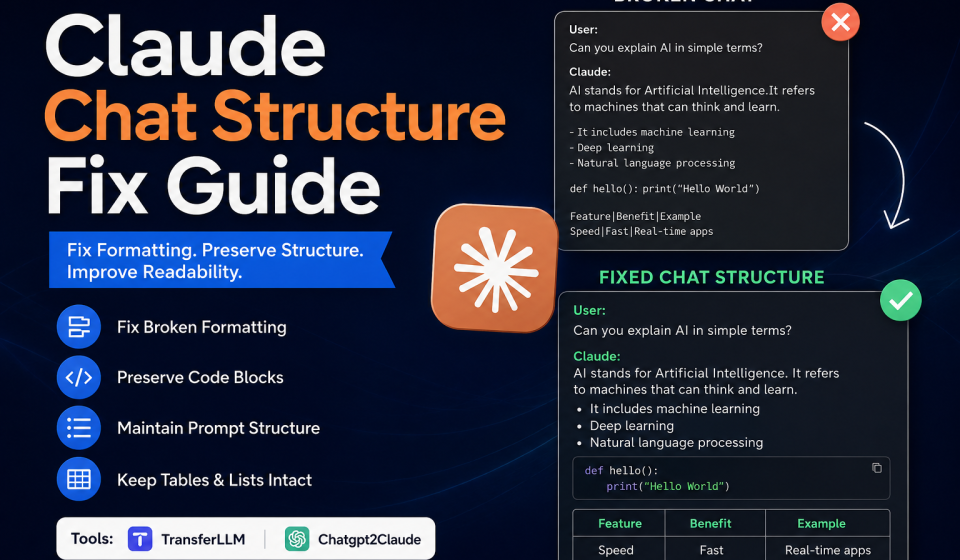

Messy chats slow you down. When formatting breaks inside Claude, your entire AI workflow suffers. Prompts look cluttered. Code blocks stop rendering. Lists disappear completely.
This guide covers every major Claude chat structure fix you need. You will also discover the best tools, including TransferLLM and Chatgpt2Claude, to make chat migration clean and reliable.
What Is a Claude Chat Structure Issue?
Meaning of Chat Structure in Claude
Chat structure in Claude refers to how your conversation is organized visually and technically. It includes several key elements.
Prompt hierarchy keeps user messages and AI responses separated properly. Paragraph spacing controls how readable the output looks. Markdown formatting handles bold text, headers, and italics. Code blocks wrap technical content so it renders correctly. Bullet points and tables organize information clearly.
When any of these elements break, the entire conversation becomes harder to read and use.
Why Formatting Breaks During Chat Transfers
Formatting breaks for several common reasons. Unsupported markdown syntax is the most frequent cause. Claude handles markdown differently than other AI tools.
Large conversation imports also cause problems. When a chat file is too big, the parser struggles to process every element correctly. Copy-paste formatting problems add invisible characters that corrupt the layout.
Browser-related issues and encoding mismatches also trigger Claude formatting issues. A file saved in one encoding may not import cleanly into a different environment.
Common Claude Formatting Problems
Broken Paragraph Alignment
Paragraphs merge together or lose their spacing entirely. Text that looked clean in ChatGPT suddenly appears as one unbroken block inside Claude.
Missing Headings and Lists
Headings revert to plain text. Bullet points disappear or display as raw hyphens. The entire content hierarchy collapses into a wall of text.
Code Blocks Not Rendering Properly
Code blocks are especially vulnerable. A missing backtick or an incorrect syntax tag causes the whole block to render as plain text. Developers lose hours trying to figure out what went wrong.
Collapsed Conversation Threads
Long threads collapse unexpectedly. Earlier context disappears, and Claude loses the flow of the conversation. This affects AI response quality significantly.
Tables and Markdown Errors
Tables break when pipe characters are missing or misaligned. Even one incorrect space can corrupt an entire table during a Claude chat structure fix attempt.
Prompt Structure Distortion
User prompts and AI responses blend together. Claude cannot distinguish instructions from context, which produces inconsistent and confusing outputs.
How to Fix Claude Chat Structure Step-by-Step
Clean Raw Chat Data Before Import
Start with the raw data. Open your chat file in a plain text editor. Look for stray HTML tags, invisible characters, or broken line breaks.
Remove everything Claude cannot interpret natively. Clean data is the foundation of every successful Claude chat structure fix.
Use Markdown-Compatible Formatting
Claude supports standard markdown. Use proper heading syntax with hash symbols. Use double asterisks for bold. Use single backticks for inline code and triple backticks for code blocks.
Do not use HTML tags for formatting. Claude may ignore them or render them as raw text.
Remove Unsupported Characters
Some characters cause serious encoding problems. Smart quotes, em dashes copied from Word documents, and special Unicode symbols often break formatting during import.
Replace them with standard ASCII characters before uploading your chat file.
Split Large Conversations into Sections
Do not import a 500-message conversation in one file. Break it into logical sections of 50 to 100 messages each. Smaller files process more reliably and preserve structure better.
This single step solves a large percentage of Claude formatting issues.
Preserve Prompt Hierarchy
Label each section clearly. Use consistent headers like “User:” and “Assistant:” to help Claude distinguish conversation roles. Keep the hierarchy consistent from start to finish.
Reformat Code Blocks Correctly
Always wrap code in triple backticks. Specify the language after the opening backticks, like “`python or “`javascript. This activates syntax highlighting and keeps code readable inside Claude.
Best Tools for Claude Chat Structure Fix
TransferLLM
TransferLLM is built specifically for structured AI conversation migration. It handles the Claude chat structure fix process automatically, so you do not have to clean files manually.
Markdown preservation is one of its strongest features. It keeps headings, lists, code blocks, and tables intact during transfer. Clean prompt formatting ensures that Claude reads each message correctly. Multi-platform compatibility means it works across ChatGPT, Gemini, and other AI tools without extra configuration.
TransferLLM is the go-to solution for teams managing large AI workflow migrations.
Chatgpt2Claude
Chatgpt2Claude focuses on one specific task: converting ChatGPT exports into Claude-ready files. It does this job very well.
The tool maintains conversation flow during the entire transfer. Readable imports mean you spend less time reformatting after migration. It supports long-form AI workflows without collapsing threads or losing context.
If you transfer ChatGPT chats to Claude regularly, Chatgot2Claude saves significant time and eliminates most formatting errors.
Best Formatting Practices for Claude
Use Consistent Markdown
Pick one formatting style and stick to it throughout the entire document. Mixing styles causes Claude to misinterpret the structure and produce inconsistent responses.
Keep Prompt Labels Clear
Label every prompt section. Clear labels help Claude understand what role each message plays. This directly improves the quality of AI responses.
Avoid Excessive Nested Formatting
Deeply nested bullet points confuse Claude’s parser. Keep lists to two levels maximum. Flat, clean formatting always performs better than complex nested structures.
Use Proper Code Syntax Highlighting
Always specify the coding language in your code blocks. This improves rendering accuracy and makes the output easier to read for both humans and AI models.
Organize Long Conversations by Sections
Use clear H2 or H3 headings to divide long conversations into named sections. This helps Claude maintain context across a long thread without losing earlier information.
How to Prevent Future Claude Formatting Issues
Export Chats Properly
Use the official export feature in your AI tool. Avoid copy-pasting directly from a browser window. Official exports retain formatting metadata that manual copying strips away.
Use Reliable Migration Tools
TransferLLM and Chatgpt2Claude exist precisely to prevent formatting failures. Use them every time you move a conversation into Claude. Manual migration creates errors that take far longer to fix.
Check Formatting Before Upload
Preview your file in a markdown viewer before uploading it to Claude. Catch errors early so you do not have to perform a Claude chat structure fix after the fact.
Maintain Clean AI Workflow Documentation
Keep a record of your formatting standards. Share them with your team. Consistent documentation prevents formatting errors before they start.
Claude vs ChatGPT Formatting Handling
Markdown Compatibility Comparison
Claude and ChatGPT both support markdown, but they handle edge cases differently. Claude is stricter about syntax. A slightly malformed table breaks inside Claude but may render fine in ChatGPT.
Long Conversation Stability
ChatGPT handles long threads with slightly more flexibility. Claude requires cleaner structure to maintain context over many messages. This makes preparation more important before importing long conversations.
Code Rendering Differences
Both tools render code blocks reliably when formatted correctly. Claude requires explicit language tags more consistently than ChatGPT does.
Prompt Context Retention
Claude retains prompt context well when the conversation structure is clean. Broken formatting disrupts this retention and leads to weaker, less relevant responses.
Benefits of Fixing Claude Chat Structure
A clean Claude chat structure fix produces real, measurable results. Better readability makes conversations easier to review and share. Improved AI responses come directly from cleaner context and structure. Easier collaboration means your team spends less time decoding messy outputs. Faster workflow management reduces friction across every AI-powered task. Better content organization keeps long projects manageable and searchable.
Common Mistakes to Avoid
Importing Raw HTML
Claude does not parse HTML formatting well. Always convert HTML to markdown before import. Raw HTML appears as cluttered, unreadable text inside Claude conversations.
Ignoring Markdown Cleanup
Skipping the cleanup step is the most common mistake. Even small markdown errors compound quickly in large files. Clean it before you upload it.
Uploading Extremely Large Chats
One massive file almost always causes problems. Split large chats into smaller, structured sections. It takes five extra minutes and saves hours of troubleshooting.
Mixing Multiple Formatting Styles
Switching between markdown, HTML, and plain text inside one file confuses Claude’s parser. Choose one format and apply it consistently from start to finish.
Using Unsupported Symbols
Symbols like curly quotes, copyright signs copied from PDFs, or non-standard dashes break encoding during import. Replace them with plain-text equivalents before uploading.
Frequently Asked Questions
Why is my Claude chat formatting broken?
Formatting breaks when imported files contain unsupported markdown, special characters, or encoding mismatches. Clean the file before importing it into Claude.
How do I fix Claude markdown issues?
Use a plain text editor to remove unsupported characters. Reformat all headings, lists, and code blocks using standard markdown syntax. Then re-import the cleaned file.
Does Claude support full markdown formatting?
Claude supports standard markdown including headings, bold, italics, lists, tables, and code blocks. It does not support HTML tags or advanced markdown extensions reliably.
Can I transfer ChatGPT chats into Claude without formatting errors?
Yes. Use Chatgpt2Claude or TransferLLM to handle the conversion automatically. Both tools preserve formatting during migration and reduce errors significantly.
Which tool is best for Claude chat migration?
TransferLLM works best for multi-platform migrations and large-scale workflows. Chatgpt2Claude is the better choice for simple ChatGPT-to-Claude transfers.
Why are my code blocks not working in Claude?
Missing backticks or absent language tags are the most likely cause. Always use triple backticks and specify the language at the start of every code block.
How do I preserve AI conversation structure?
Split long conversations into sections. Use consistent prompt labels. Keep markdown formatting clean throughout. A structured Claude chat structure fix approach prevents most issues.
Does TransferLLM maintain Claude formatting?
Yes. TransferLLM is designed to preserve markdown, code blocks, headings, and prompt hierarchy during migration. It is one of the most reliable tools for this task.
Can Chatgpt2Claude fix broken chat layouts?
Chatgpt2Claude converts ChatGPT exports into clean Claude-compatible files. It resolves most layout issues that appear during manual transfers.
How do I clean AI conversation imports?
Open the file in a text editor. Remove HTML tags and unsupported characters. Standardize all markdown. Split the file into smaller sections if it is very long. Then import it into Claude.
Conclusion
Clean chat formatting is not optional. It directly affects how well Claude understands your prompts, how useful its responses are, and how smoothly your entire AI workflow runs.
Every Claude chat structure fix starts with the same basic steps: clean your data, use standard markdown, and split large files into manageable sections. These habits eliminate most formatting problems before they start.
Tools like TransferLLM and Chatgpt2Claude make the process faster and more reliable. Use them for every migration, not just when something breaks.
Follow markdown best practices consistently. Keep your AI workflow documentation organized. The investment you make in clean structure pays back every time Claude delivers a sharper, more accurate response.