Google Gemini vs Google AI Mode: Key Differences, Use Cases, and Which One You Should Actually Use in 2026

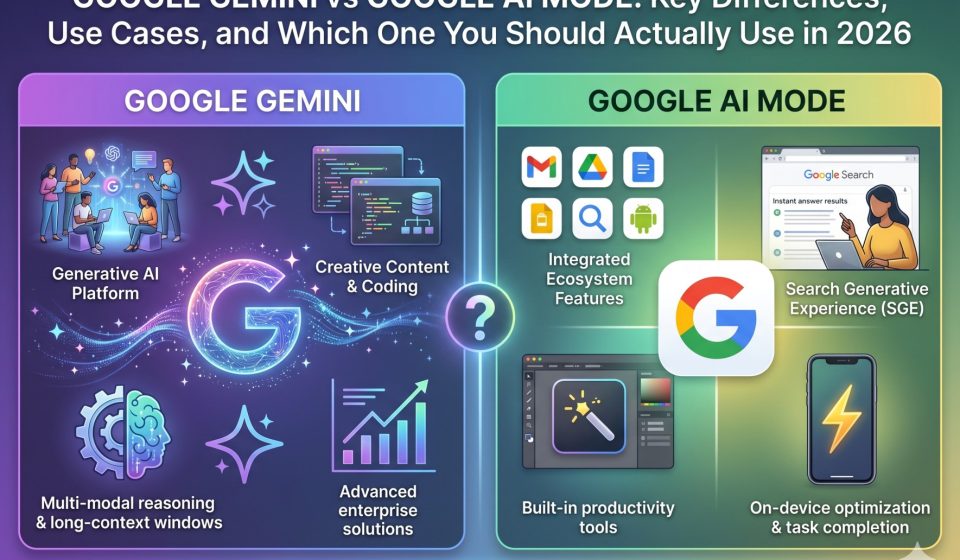
Google has released two distinct AI products that are causing genuine confusion among everyday users and professionals alike. Google Gemini is a standalone AI assistant you access at gemini.google.com or through the Gemini mobile app. Google AI Mode is an AI-powered layer built directly inside Google Search, available at google.com when the feature is enabled for your account. They share the same underlying model family, but their purpose, interface, and practical use cases are fundamentally different. This guide explains everything you need to know about Google AI Mode vs Gemini before you commit to one workflow or the other.
What Is Google Gemini in 2026
Google Gemini is a full-featured conversational AI assistant built by Google DeepMind. It is available as a dedicated web app, a mobile app for Android and iOS, and as an integrated assistant on Pixel devices. Gemini supports multi-turn conversations, file uploads, image analysis, code generation, document summarization, and long-form reasoning tasks. The platform offers free access through Gemini 1.5 Flash and paid access to Gemini 1.5 Pro and Gemini Advanced through a Google One AI Premium subscription.
Gemini is designed to function like a thinking partner. You can open a conversation, build context over multiple exchanges, and continue that thread later. It integrates with Google Workspace apps including Docs, Sheets, Gmail, and Drive, making it a productivity tool as much as a chat interface. If you want a persistent assistant that remembers the direction of a conversation within a session and optionally across sessions with Memory enabled, Gemini is the product built for that purpose.
For users who have been asking how Gemini compares to ChatGPT in terms of core capability, the honest answer is that Gemini has closed the gap significantly in 2025 and 2026, particularly in multimodal tasks and code generation, while still trailing in certain areas of complex reasoning and instruction following.
What Is Google AI Mode in 2026
Google AI Mode is not a standalone assistant. It is a feature inside Google Search that generates an AI-synthesized answer at the top of your search results, replacing or supplementing the traditional list of blue links. When AI Mode is active, Google processes your search query through a Gemini-family model and constructs a paragraph-style response that blends sourced information with reasoning, often including inline citations, follow-up question suggestions, and a summary panel.
AI Mode first rolled out as an experiment through Google Search Labs and has expanded significantly through 2025 into 2026 as part of Google’s broader AI Overviews strategy. The product competes directly with Perplexity AI and Microsoft Copilot’s Bing integration, both of which similarly layer AI synthesis on top of web search results.
The critical distinction is that AI Mode does not support persistent conversations in the way Gemini does. Each search is largely stateless unless you specifically engage with the follow-up suggestions. You cannot build a multi-turn context the way you can in Gemini Advanced, and you cannot upload files or paste documents for analysis. AI Mode is optimized for fast, query-level information retrieval, not extended reasoning or project-based work.
You can read a detailed breakdown of the differences between AI Mode and Gemini in search contexts if you want a deeper comparison focused specifically on the search experience.
Head-to-Head Comparison: Google Gemini vs Google AI Mode
Purpose and Design Intent
Gemini is built for depth. It handles long conversations, complex document analysis, coding assistance, creative writing, and structured reasoning across many turns. AI Mode is built for speed. It answers a search query with an AI synthesis in under two seconds and gets out of your way.
If you think of the spectrum from “quick lookup” to “extended thinking session,” AI Mode sits at the quick lookup end and Gemini sits at the extended thinking end. They are not really competing for the same use case when you examine them at this level.
Context and Memory
Gemini maintains context throughout a session. With Gemini Advanced and Memory enabled, it can recall preferences and background information across separate sessions. AI Mode has no persistent memory. Each search query is essentially treated as new, and while follow-up questions within a single AI Mode session do build on prior context, closing the tab resets everything.
Access to Real-Time Web Data
Both products have access to real-time web information, but they use it differently. In AI Mode, every response is grounded in live search results, and citations are a core part of the output. In Gemini, real-time search is available but is invoked selectively rather than automatically on every message. For tasks where you need the most current news or data, AI Mode may surface fresher sourcing by default.
Integration with Google Workspace
Gemini integrates directly with Gmail, Docs, Sheets, Slides, and Drive through the Gemini side panel inside those apps. AI Mode has no Workspace integration. This makes Gemini the right choice for professional workflows that rely on the Google productivity suite.
File and Image Input
Gemini accepts file uploads, image inputs, and even video in some contexts. AI Mode does not. You can paste an image into a Gemini conversation for analysis; you cannot do that inside a standard Google Search AI Mode session.
Pricing
Gemini is free with limitations and available in an advanced tier through Google One AI Premium, which costs approximately USD 19.99 per month as of 2026. AI Mode is available as part of Google Search at no additional charge, though access is still rolling out by region and account type.
When You Should Use Google Gemini
Use Gemini when you are working on something that requires sustained attention, multiple exchanges, or document-level analysis. Research projects, coding workflows, email drafting, summarization of long reports, brainstorming, and any task where you need the AI to hold context and build on it across turns all belong in Gemini. If you are a professional who already uses Google Workspace heavily, Gemini’s integration into those apps makes it the obvious choice.
Gemini is also the right tool if you want to eventually move your conversation history somewhere else. Users who have been building workflows in Gemini and want to shift to another platform should know that tools exist to help with that transition. You can switch from Gemini to Claude without losing your conversation history if you use a local transfer tool designed for that purpose, and the process preserves message structure, code blocks, and full context.
When You Should Use Google AI Mode
Use AI Mode when you need a fast, sourced answer to a specific question and you would normally have opened Google Search anyway. It is excellent for looking up current events, getting a quick synthesis of a topic you are unfamiliar with, comparing products, or getting a summarized answer to a factual question without wanting to click through five different websites.
AI Mode is also well-suited for people who do most of their research inside Google Search and want AI assistance without switching to a separate tab or app. The friction is lower because you are already in the search interface.
The Overlap Problem: When Users Get Confused
The confusion between Gemini and AI Mode typically arises in two situations. The first is when a user sees an AI-generated answer in Google Search and assumes they are talking to Gemini the assistant. They are not. They are seeing AI Mode output, which is derived from a Gemini-family model but does not behave like the Gemini chat interface. The second situation is when a user opens Gemini expecting it to work like a search engine and feels frustrated that it does not always surface citations or live links the way AI Mode does by default.
Google has not done a particularly clean job of communicating these product boundaries to general users. The shared branding creates a blurring effect. Understanding the distinction helps you pick the right tool for the right task rather than asking one product to do the job of the other.
How AI Platform Competition Is Affecting User Behavior in 2026
The proliferation of AI tools across Google, OpenAI, Anthropic, and Meta has created a situation where users accumulate conversation histories and workflows across multiple platforms before eventually consolidating on the one that fits their needs best. This means that conversation portability has become a real concern.
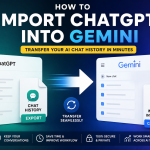
Users who have been building knowledge threads in Gemini and decide to migrate to Claude, for example, face the challenge of transferring months of context without losing structure. This is a solvable problem. TransferLLM’s Gemini to Claude migration tool handles that transfer locally on your device, so nothing is routed through a third-party server. Similarly, users moving between ChatGPT and Gemini can use chatgpt2gemini.com to transfer conversations across those platforms without manual copy-pasting. For users switching from ChatGPT to Claude directly, chatgpt2claude.com offers the same local migration workflow.
The broader point is that choosing between Gemini and AI Mode is not necessarily a permanent decision. As these platforms evolve, the ability to move your conversation history matters more than it did when AI assistants were relatively new and most users were starting fresh conversations anyway.
SEO and AI Search Visibility Implications of Gemini vs AI Mode
For publishers, marketers, and content creators, the rise of AI Mode inside Google Search has significant implications that are separate from anything Gemini as a chat assistant does. When AI Mode synthesizes an answer at the top of a search results page, it may reduce click-through rates to the underlying websites it cites. This is a visibility challenge that has prompted a new category of analytics tools focused on AI search monitoring.
Gemini as a chat assistant represents a different channel entirely. When users ask Gemini a question, the sources it cites or the information it surfaces come from a different retrieval process than the one powering AI Mode. A brand can be highly visible in AI Mode results while being invisible in Gemini answers, or vice versa. Tracking performance across both surfaces requires understanding that they are separate AI products with different sourcing behaviors.
If you want to understand how Gemini AI performance metrics work and how to track them, that guide covers the measurement side in more detail.
What to Expect from Both Products Through the Rest of 2026
Google is continuing to expand AI Mode in Search to more regions and users through 2026, and the feature set is growing to include more interactive follow-up capabilities. Gemini is also being updated with expanded context windows, better multimodal input handling, and deeper Workspace integration. The two products are not converging into one; they are diverging further in their specialization.
Users who need both speed and depth will likely use both products in different situations, much as they might use a quick Google Search for some things and open a full document editor for others. The question is not really which product is better in absolute terms. It is which product matches the specific task in front of you right now.
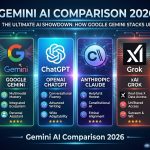
For a fuller comparison of how Gemini stacks up against other AI tools in 2026, that resource walks through the direct capability comparisons with ChatGPT and other competing platforms.
Frequently Asked Questions
Q1: Is Google AI Mode the same thing as Google Gemini?
No. Google AI Mode is a feature built into Google Search that generates AI-synthesized answers at the top of search results. Google Gemini is a separate standalone AI assistant available at gemini.google.com and through the Gemini mobile app. Both use Gemini-family models under the hood, but they are distinct products with different interfaces, capabilities, and use cases.
Q2: Can I have a multi-turn conversation inside Google AI Mode?
You can ask follow-up questions within a single AI Mode session, and it will maintain context for those follow-ups. However, AI Mode does not offer persistent memory across sessions the way Gemini does, and the conversation resets when you leave the search page. For sustained multi-turn work, Gemini is the appropriate tool.
Q3: Do I need to pay for Google Gemini to use AI Mode in Search?
AI Mode in Google Search is available without a separate subscription, though availability is still expanding by region and account type as of 2026. Gemini itself is free at the base tier, with advanced features and the Pro model available through a Google One AI Premium subscription.
Q4: If I have built up a lot of conversation history in Gemini, can I move it to another AI platform?
Yes. Tools like gemini2claude.com allow you to transfer your Gemini conversation history directly to Claude, and the process runs entirely on your local device without routing data through third-party servers. Context, formatting, and message structure are all preserved in the transfer.
Q5: Which product should I choose if I primarily want to research topics online?
If your main goal is fast, sourced answers to specific research questions that you would normally search for online, AI Mode inside Google Search is more naturally suited to that workflow. If you need to analyze documents, build extended research threads, or work through a topic with multi-turn depth, Gemini is the better choice.