How to Move ChatGPT Chats to Gemini in 2026: Complete Guide to Transfer Conversations Without Losing Context

Many people now use more than one AI assistant. Some prefer ChatGPT for content creation, while others use Gemini for research, Google Workspace integration, or daily productivity tasks.
The challenge appears when you decide to switch platforms.
You may have months of valuable conversations stored inside ChatGPT. Those chats often contain project plans, research notes, prompt libraries, business strategies, marketing campaigns, and important context. Starting from scratch inside Gemini can waste time and reduce productivity.
The good news is that you can move ChatGPT chats to Gemini and continue your work without rebuilding everything manually.
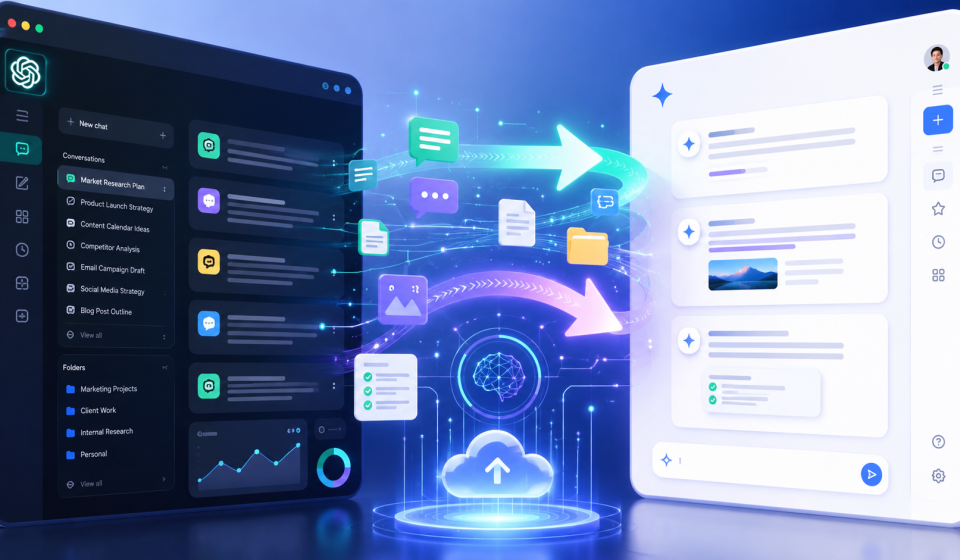
In this guide, you will learn how to transfer ChatGPT conversations to Gemini, what challenges you may face, and how tools like TransferLLM and ChatGPT2Gemini can simplify the process.
Quick Answer: Can You Move ChatGPT Chats to Gemini?
Yes, you can move ChatGPT chats to Gemini.
The simplest method is to copy and paste conversations manually. However, this approach becomes difficult when you have large chat histories, complex projects, multiple conversations, or attached files.
A more efficient approach is to use a conversation transfer tool such as TransferLLM. These tools help preserve context, organize conversations, and reduce manual work when migrating from ChatGPT to Gemini.
Why Are People Moving from ChatGPT to Gemini?
The AI landscape continues to evolve. Many users no longer rely on a single platform.
Instead, they choose the best AI assistant for specific tasks.
Some common reasons include:
Better Integration with Google Services
Gemini works closely with Google’s ecosystem. Users can connect their workflows with Gmail, Google Docs, Google Drive, and other Google products.
This integration creates a smoother experience for people who already use Google Workspace daily.
Access to Different AI Capabilities
Every AI model has strengths and weaknesses.
Some users prefer ChatGPT for brainstorming and content creation. Others use Gemini for research, information retrieval, and productivity workflows.
Using multiple AI platforms often produces better results than relying on a single tool.
Managing Multi-AI Workflows
Modern professionals frequently switch between different AI systems.
Marketing teams, developers, researchers, and business owners often use ChatGPT, Gemini, Claude, and other AI tools together.
Moving conversations between platforms helps maintain workflow continuity.
What Happens When You Switch AI Platforms?
Many users assume they can simply open Gemini and continue where ChatGPT left off.
Unfortunately, the process is not always seamless.
Several challenges can appear during migration.
Lost Context
Context is one of the most valuable parts of an AI conversation.
A long discussion may contain dozens of instructions, project details, goals, and preferences.
If that context disappears, Gemini may not understand the full background of your project.
Missing Conversation History
Chat histories often contain valuable information that took weeks or months to build.
Losing those conversations can create unnecessary delays.
Formatting Issues
Chat exports do not always appear perfectly when moved between platforms.
Lists, tables, code blocks, and structured content may require adjustments.
Workflow Disruption
Many users depend on AI conversations as part of their daily work process.
Starting over can reduce efficiency and create confusion.
What Data Should You Transfer from ChatGPT to Gemini?
Before beginning the migration process, identify the information that matters most.
Not every conversation needs to move.
Focus on high-value assets such as:
Important Conversations
Project discussions, business planning sessions, and research threads should usually be transferred.
Prompt Libraries
Many users spend months developing effective prompts.
These prompt collections often represent significant intellectual property.
Research Notes
Research conversations frequently contain valuable references, summaries, and insights.
Custom Instructions
Custom instructions help AI systems understand your preferences.
Keeping these instructions consistent improves output quality.
Files and Attachments
If your conversations include uploaded documents, spreadsheets, presentations, or images, review how they will be handled during migration.
Project Documentation
Long-term projects benefit from maintaining complete context across platforms.
Manual Method: Copy and Paste ChatGPT Chats into Gemini
The simplest way to move ChatGPT chats to Gemini is manual transfer.
This method works well for small conversations.
Step 1: Open Your ChatGPT Conversation
Locate the conversation you want to move.
Review the chat and identify the important sections.
Step 2: Copy the Content
Select the conversation text and copy it.
Try to preserve formatting whenever possible.
Step 3: Open Gemini
Create a new conversation inside Gemini.
Step 4: Paste the Content
Paste the copied conversation into Gemini.
Provide additional instructions if necessary.
For example:
“Please review this previous ChatGPT conversation and continue helping me with this project.”
Advantages of Manual Transfer
- No additional software required
- Works for small conversations
- Simple process
- Immediate access
Disadvantages of Manual Transfer
- Time-consuming
- Difficult for large projects
- Context may be lost
- Formatting issues can occur
- Not practical for multiple conversations
Why Manual Chat Transfer Becomes Difficult
Manual transfer seems easy at first.
However, the challenges become obvious as conversations grow larger.
Large Conversation Histories
Many users have hundreds of conversations stored inside ChatGPT.
Copying each conversation individually can take hours or even days.
Complex Project Structures
Business projects often include multiple related conversations.
Keeping those relationships intact becomes difficult during manual migration.
Missing Attachments
Files do not always transfer smoothly between platforms.
Users may need to upload documents again.
Broken Context Chains
A conversation may depend on earlier discussions.
Moving only part of the conversation can reduce accuracy.
Productivity Loss
Time spent copying and organizing chats is time not spent completing important work.
The Faster Way: Use TransferLLM to Move ChatGPT Chats to Gemini
As AI adoption grows, conversation portability has become increasingly important.
TransferLLM helps users move conversations between AI platforms without relying entirely on manual copy-and-paste methods.
The goal is simple.
Keep your workflow moving while preserving as much context as possible.
What Is TransferLLM?
TransferLLM is a platform designed to help users transfer AI conversations between different AI assistants.
Instead of rebuilding projects from scratch, users can move valuable chat history from one platform to another.
How ChatGPT2Gemini Works
ChatGPT2Gemini focuses specifically on helping users transition conversations from ChatGPT to Gemini.
The process is designed to reduce friction and preserve important information during migration.
Key Benefits
Context Preservation
Project details remain easier to manage.
Better Organization
Conversations stay structured and accessible.
Faster Migration
Users avoid repetitive manual work.
Improved Productivity
Teams can continue projects without unnecessary interruptions.
Step-by-Step Guide to Transfer ChatGPT Chats to Gemini Using TransferLLM
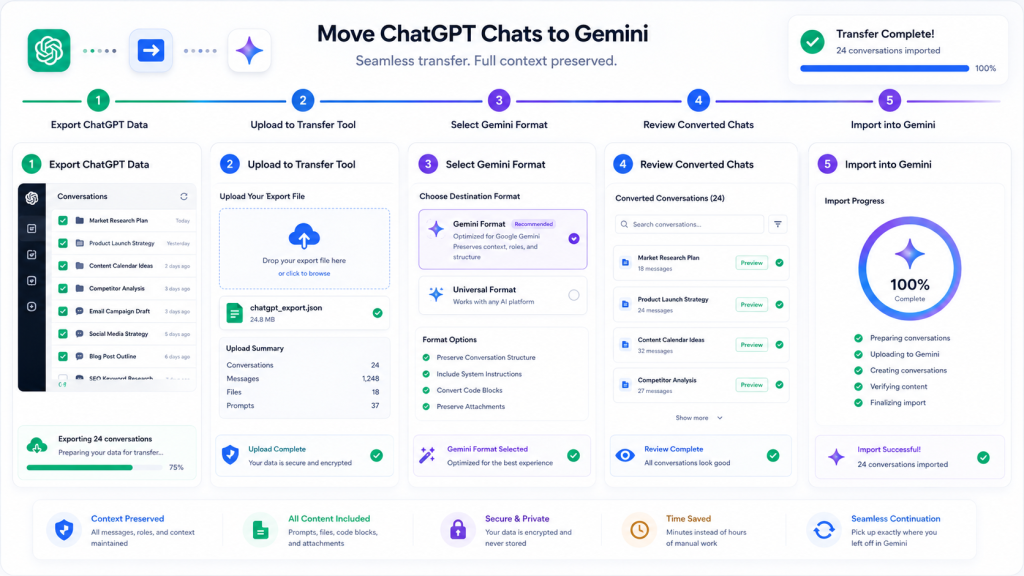
If you want to move conversations efficiently, a dedicated migration tool can simplify the process.
The exact workflow may vary, but the general process remains straightforward.
Step 1: Export Your ChatGPT Data
Start by exporting the conversations you want to move.
Review your chat history and identify the projects, prompts, and conversations that are important to keep.
Step 2: Upload Your Data to TransferLLM
Upload the exported files to TransferLLM.
The platform helps organize and prepare conversations for transfer between AI systems.
Step 3: Choose Gemini as the Destination
Select Gemini as the target platform.
Tools such as ChatGPT2Gemini are designed specifically for this workflow.
Step 4: Review Your Conversations
Before importing, review the converted conversations.
Check formatting, prompts, and project structures to ensure everything appears correctly.
Step 5: Import and Continue Working
Once the transfer is complete, open Gemini and continue your work.
Instead of rebuilding context from scratch, you can resume existing projects with much less effort.
Benefits of Moving ChatGPT Chats to Gemini
Conversation migration is not just about saving time.
It also helps maintain continuity across your AI workflows.
Continue Existing Projects
Many users have active projects running inside ChatGPT.
Moving conversations allows those projects to continue inside Gemini without losing valuable information.
Preserve Research History
Research conversations often contain detailed notes, references, and findings.
Keeping this information available helps prevent duplicate work.
Retain Valuable Prompts
High-performing prompts can take weeks or months to develop.
Transferring them protects your investment in prompt engineering.
Improve Productivity
A well-organized conversation history reduces the time spent searching for information.
Build Multi-AI Workflows
Many professionals now use multiple AI assistants together.
Conversation portability makes this strategy much easier to manage.
Common Problems During ChatGPT to Gemini Migration
Even with specialized tools, users may encounter a few challenges.
Formatting Changes
Tables, lists, and structured content may appear differently after transfer.
Solution: Review imported content and make minor formatting adjustments where necessary.
Large Conversation Limits
Very long chats may require segmentation.
Solution: Break large projects into smaller conversation groups before migration.
Missing Files
Some files may need to be uploaded again.
Solution: Maintain a separate backup of important attachments.
Context Compression
AI systems process context differently.
Solution: Include project summaries and key objectives when importing conversations.
Best Practices for Preserving Context
Successful migration depends on preparation.
These practices help maintain conversation quality after the transfer.
Organize Conversations Before Exporting
Delete unnecessary chats and focus on high-value conversations.
Group Related Threads
Keep project-related conversations together.
This makes imported content easier to understand.
Create Project Summaries
A concise project overview helps Gemini understand the purpose of the conversation.
Store Prompt Libraries Separately
Maintain a dedicated prompt library for easy reuse.
Verify Critical Information
Review important conversations after migration to confirm accuracy.
ChatGPT vs Gemini: Which AI Fits Your Workflow?
The answer depends on your goals.
Many users benefit from using both platforms.
| Use Case | ChatGPT | Gemini |
| Content Creation | Excellent | Strong |
| Brainstorming | Excellent | Strong |
| Google Workspace Integration | Limited | Excellent |
| Research Tasks | Strong | Excellent |
| Workflow Automation | Strong | Strong |
| Multi-Platform Collaboration | Strong | Strong |
Rather than choosing one platform exclusively, many professionals build workflows that combine the strengths of both.
Who Should Move ChatGPT Chats to Gemini?
Conversation migration is useful for many types of users.
Marketers
Marketing teams often store campaign ideas, content calendars, and audience research inside AI conversations.
Developers
Developers use AI conversations for debugging, documentation, and coding workflows.
Researchers
Research projects frequently involve long conversation histories that contain valuable insights.
Students
Students can preserve study notes, summaries, and learning materials.
Business Owners
Business planning discussions often contain information worth keeping across platforms.
Agencies
Agencies managing multiple clients can maintain continuity when changing AI tools.
Future of AI Conversation Portability
The AI industry is moving toward a future where users work across multiple platforms.
Instead of committing to a single assistant, professionals increasingly choose the best tool for each task.
As this trend continues, conversation portability will become more important.
Users want the freedom to move between AI platforms without losing years of work.
Platforms such as TransferLLM are helping make that future possible by reducing the friction involved in switching AI ecosystems.
Key Takeaways
- You can move ChatGPT chats to Gemini using manual methods or migration tools.
- Manual copy-and-paste works for small conversations but becomes difficult for larger projects.
- Context preservation is the biggest challenge during migration.
- Prompt libraries, research notes, and project conversations are valuable assets worth transferring.
- TransferLLM and ChatGPT2Gemini help simplify conversation migration.
- Multi-AI workflows are becoming common among professionals and businesses.
Frequently Asked Questions
Can you move ChatGPT chats to Gemini?
Yes. You can transfer conversations manually or use migration tools that help preserve context and structure.
How do I transfer ChatGPT conversations to Gemini?
Export your conversations, prepare them for migration, and import them into Gemini. Dedicated transfer tools can simplify this process.
Will I lose context when switching from ChatGPT to Gemini?
Some context can be lost if conversations are transferred manually. Organizing conversations and using migration tools helps reduce this issue.
What is the easiest way to move ChatGPT chats to Gemini?
Most users find dedicated migration platforms easier than manually copying and pasting large conversations.
Can I transfer prompts and research notes?
Yes. Prompt libraries, project documentation, and research conversations are among the most valuable items to transfer.
Is manual transfer a good option?
Manual transfer works for a few conversations. It becomes less practical when dealing with large chat histories.
Conclusion
AI conversations have become valuable business assets.
They contain research, strategies, prompts, project plans, and institutional knowledge that can take months to build.
When moving from ChatGPT to Gemini, the goal is not simply transferring text. The goal is preserving context, maintaining productivity, and continuing important work without interruption.
Manual methods can work for small projects. However, larger workflows often require a more organized approach.
TransferLLM and ChatGPT2Gemini help users move conversations more efficiently while reducing the risk of losing valuable information.
As multi-AI workflows become the norm, conversation portability will continue to play a bigger role in how people work with artificial intelligence.
If you want to move ChatGPT chats to Gemini without rebuilding projects from scratch, now is the time to create a migration strategy that protects your prompts, conversations, and workflow history.