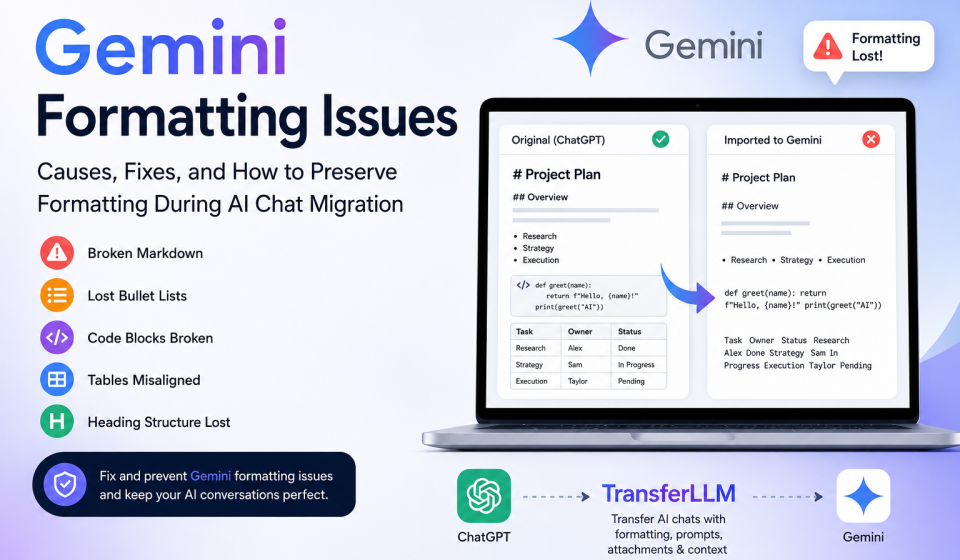
Gemini Formatting Issues: Causes, Fixes, and How to Preserve Formatting During AI Chat Migration

Have you ever moved an important conversation into Gemini and noticed that the formatting suddenly looks different?
Maybe your headings disappeared. Your bullet points became plain text. Code blocks lost their structure. Tables broke. Even carefully crafted prompts became difficult to read.
This is one of the most common frustrations for people who work with AI tools every day.
Formatting problems may seem minor at first. However, they can affect productivity, readability, collaboration, and prompt performance. When conversations lose their structure, users spend extra time fixing content instead of focusing on their actual work.
The challenge becomes even bigger when users migrate conversations between platforms such as ChatGPT, Gemini, and Claude.
In this guide, you will learn what causes Gemini formatting issues, how to fix them, and how to preserve formatting when transferring conversations between AI platforms.
What Are Gemini Formatting Issues?
Gemini formatting issues occur when text structure changes unexpectedly inside conversations, imported chats, prompts, or generated content.
These issues can appear in different ways. Some are small visual problems, while others can affect how information is understood.
Common formatting issues include:
- Broken markdown
- Missing headings
- Lost bullet points
- Incorrect numbering
- Damaged code blocks
- Broken tables
- Inconsistent spacing
- Missing line breaks
- Altered prompt structure
For casual users, these problems may be annoying. For developers, marketers, researchers, and content creators, they can become serious workflow disruptions.
Common Formatting Problems Users Experience
Broken Markdown
Markdown helps organize content with headings, lists, links, and emphasis.
When markdown does not render correctly, the content becomes harder to scan and understand.
For example:
Instead of displaying:
Marketing Strategy
The content may appear as:
Marketing Strategy
The formatting syntax remains visible instead of converting into a proper heading.
Missing Code Blocks
Developers often rely on code blocks to maintain clean formatting.
When code blocks break during migration, code becomes difficult to read and test.
A properly formatted code snippet may turn into a plain text paragraph, making debugging more difficult.
Lost Bullet Lists
Lists improve readability and organization.
Many users notice that bullet points disappear or merge into long paragraphs after transferring conversations.
This issue often affects documentation, project planning, and educational content.
Incorrect Heading Structures
Headings help users understand content hierarchy.
When heading levels change unexpectedly, the document loses structure and becomes harder to navigate.
Why Formatting Matters in AI Conversations
Many people think formatting is only about appearance.
The reality is different.
Formatting affects:
- Readability
- Knowledge organization
- Prompt clarity
- Collaboration
- Documentation quality
- Workflow efficiency
A well-structured prompt helps AI understand instructions more clearly.
A poorly formatted prompt can lead to inconsistent responses and reduced output quality.
This is why preserving formatting has become an important part of AI conversation management.
Why Does Gemini Sometimes Change Formatting?
Gemini Formatting issues usually occur because different AI platforms process content differently.
Each platform has its own rendering system, markdown support level, and conversation structure.
When content moves from one platform to another, compatibility problems may appear.
Differences Between AI Platforms
ChatGPT, Gemini, and Claude all support structured content.
However, they do not always interpret formatting in the same way.
A markdown element that works perfectly in one platform may display differently in another.
These differences often become visible during conversation migration.
Markdown Compatibility Challenges
Markdown has become the standard formatting language for AI workflows.
Even though most AI platforms support markdown, implementation details can vary.
Common compatibility challenges include:
- Heading rendering differences
- Nested list behavior
- Table formatting support
- Code block interpretation
- Link formatting variations
Small differences can create significant formatting problems when conversations move between systems.
Export and Import Limitations
Many users manually copy and paste conversations.
This method seems simple, but it introduces several risks.
Copy-paste transfers may lose:
- Metadata
- Formatting structure
- Context hierarchy
- Attachments
- Conversation relationships
As conversations become larger, these risks increase.
Prompt Structure Conversion Problems
Prompt engineering often relies on carefully organized formatting.
Users commonly create prompts with:
- Headings
- Sections
- Instructions
- Variables
- Examples
- Output requirements
When formatting changes during migration, the prompt structure may become less effective.
This can affect AI response quality and consistency.
Most Common Gemini Formatting Issues Explained
Understanding the most frequent formatting problems helps users identify and solve them quickly.
Markdown Rendering Errors
Markdown rendering errors occur when Gemini displays formatting syntax instead of converting it into formatted content.
Examples include:
- Visible hashtags (#)
- Unformatted bold text
- Broken links
- Incorrect heading rendering
These issues often appear after importing content from another platform.
Code Snippet Formatting Problems
Code formatting is especially sensitive during migration.
Common problems include:
- Missing indentation
- Broken syntax highlighting
- Removed code fences
- Merged code sections
Even small formatting changes can make code difficult to understand.
Table Formatting Issues
Tables help organize structured information.
However, tables often break during AI conversation transfers.
Users may notice:
- Misaligned columns
- Missing borders
- Broken rows
- Data placement errors
This issue frequently affects reports, documentation, and research projects.
Numbered List and Bullet List Errors
Lists provide visual organization.
Formatting problems can cause:
- Incorrect numbering
- Missing bullets
- Merged items
- Broken hierarchy
As a result, information becomes harder to follow.
Broken Links and Embedded Content
Links sometimes lose their formatting after migration.
Users may encounter:
- Invalid hyperlinks
- Missing anchor text
- Broken references
- Incomplete embedded content
This creates additional work when reviewing migrated conversations.
Lost Context Formatting
Context formatting is often overlooked.
Conversations contain relationships between prompts, responses, instructions, and references.
When formatting changes, these relationships become harder to identify.
This can reduce the value of archived conversations and knowledge bases.
How Gemini Formatting Issues Affect Productivity
Gemini formatting issues create more than visual problems.
They directly affect daily workflows.
Reduced Readability
Poor formatting forces users to spend extra time understanding content.
Instead of scanning information quickly, they must manually reorganize text.
Workflow Interruptions
Teams often rely on AI conversations for documentation and collaboration.
Broken formatting interrupts these workflows and increases manual correction time.
Prompt Performance Problems
Prompt quality depends heavily on structure.
When formatting changes, instructions may lose clarity.
This can reduce output consistency and increase revision work.
Team Collaboration Challenges
Shared AI conversations are easier to use when formatting remains intact.
When formatting breaks, team members may interpret information differently.
This creates confusion and slows down decision-making.
In the next section, we will cover practical fixes for Gemini formatting issues and explain how tools like TransferLLM help preserve formatting, prompts, attachments, and context during AI conversation migration.
How to Fix Gemini Formatting Issues
The good news is that most formatting problems can be fixed with a few simple steps.
If you notice broken formatting after importing or creating content in Gemini, start with the following solutions.
Check Markdown Syntax
Markdown errors are one of the most common causes of formatting problems.
Review your content and make sure:
- Headings use the correct number of hashtags
- Lists use consistent formatting
- Code blocks start and end properly
- Links follow standard markdown structure
- Tables contain matching columns
Even a small syntax mistake can affect how Gemini displays content.
Rebuild Heading Structures
Headings create a logical hierarchy.
If imported content loses its structure, manually restore:
- H1 for the main title
- H2 for major sections
- H3 for subsections
- H4 for detailed breakdowns
A clear structure improves readability and helps AI understand content relationships.
Reformat Lists and Tables
Lists and tables often require manual adjustments after migration.
Check:
- Number sequences
- Bullet alignment
- Table rows and columns
- Spacing between sections
Proper formatting makes information easier to scan and understand.
Verify Code Blocks
If you work with code, always test code formatting after migration.
Confirm that:
- Indentation remains intact
- Code fences are preserved
- Line breaks remain accurate
- Syntax formatting looks correct
This step helps prevent development errors later.
Test Before Sharing
Before using migrated conversations in projects, documentation, or client work, review the content carefully.
A quick review can identify formatting issues before they create larger problems.
How to Prevent Formatting Loss When Migrating AI Conversations
Fixing formatting is helpful.
Preventing formatting loss is even better.
The following best practices can reduce migration issues significantly.
Export Conversations Properly
Many users rely on copy-and-paste transfers.
While convenient, this approach often removes important formatting elements.
Whenever possible, use structured export methods that preserve:
- Markdown
- Metadata
- Attachments
- Context relationships
- Prompt organization
Preserve Metadata
Metadata includes information that helps maintain conversation structure.
Examples include:
- Timestamps
- Thread relationships
- Context references
- Conversation hierarchy
Without metadata, conversations may lose important organizational details.
Maintain Prompt Structure
Prompt formatting affects AI performance.
Keep:
- Headings
- Instructions
- Variables
- Examples
- Output requirements
in their original format whenever possible.
Keep Attachments Organized
Many AI workflows include:
- PDFs
- Documents
- Images
- Research files
- Reference materials
Organized attachments help preserve context during migration.
Using TransferLLM to Preserve Formatting During Migration
Many users discover that manual migration becomes difficult as conversations grow larger.
This is where TransferLLM helps.
TransferLLM is designed specifically for AI conversation migration. The platform helps users move conversations between AI systems while preserving formatting, prompts, attachments, and context.
Instead of rebuilding conversations manually, users can transfer their work more efficiently.
How TransferLLM Works
TransferLLM captures conversation structure and prepares it for migration.
The platform focuses on preserving critical elements such as:
- Conversation history
- Prompt hierarchy
- Formatting structure
- Attachments
- Context relationships
This approach reduces the risk of broken formatting during transfers.
Supported AI Platforms
TransferLLM supports migration workflows involving popular AI platforms, including:
- ChatGPT
- Gemini
- Claude
This allows users to switch platforms without rebuilding important conversations from scratch.
Formatting Preservation Features
One of the biggest advantages of TransferLLM is formatting preservation.
The platform helps retain:
- Markdown formatting
- Headings
- Lists
- Tables
- Code blocks
- Structured prompts
As a result, conversations remain easier to read and use after migration.
Context and Prompt Retention
Formatting is only one part of the migration process.
Context also matters.
TransferLLM helps preserve:
- Prompt intent
- Conversation flow
- Instruction hierarchy
- Workflow structure
This improves continuity when switching between AI platforms.
Migration Workflow Example
A content strategist creates a complete SEO content plan inside ChatGPT.
The conversation contains:
- Content briefs
- Keyword research
- Structured prompts
- Tables
- Workflow instructions
The strategist later decides to continue the project in Gemini.
Instead of manually copying hundreds of messages and fixing formatting errors, TransferLLM helps transfer the conversation while preserving structure and context.
The result is a smoother workflow and less manual work.
TransferLLM vs Manual Migration
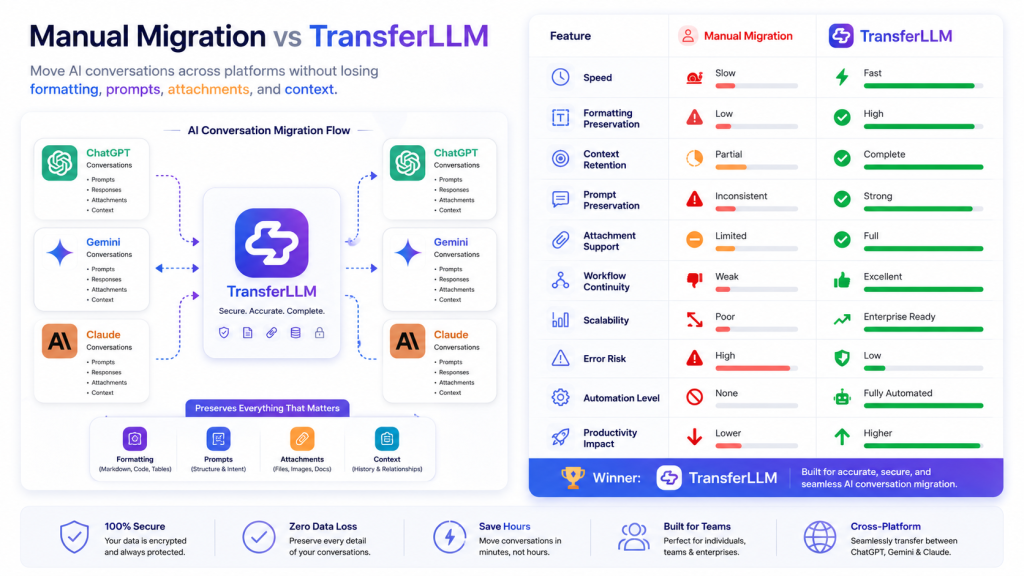
The differences become more obvious as conversations become larger and more complex.
| Feature | Manual Migration | TransferLLM |
| Speed | Slow | Fast |
| Formatting Preservation | Limited | High |
| Context Retention | Inconsistent | Strong |
| Prompt Preservation | Partial | Comprehensive |
| Attachment Handling | Difficult | Simplified |
| Error Risk | Higher | Lower |
| Workflow Continuity | Limited | Strong |
For users who manage AI-driven workflows daily, reducing migration friction can save significant time.
Best Practices for AI Conversation Portability
AI users increasingly work across multiple platforms.
Following these best practices helps future-proof conversations.
Standardize Prompt Formatting
Use consistent:
- Heading structures
- Prompt templates
- Output instructions
- Section organization
Consistency improves portability across platforms.
Maintain Structured Workflows
Organized workflows are easier to migrate.
Keep related conversations grouped by:
- Project
- Client
- Topic
- Campaign
This simplifies future transfers.
Store Conversations in Portable Formats
Portable formats help preserve information across systems.
Consider maintaining archives that support:
- Markdown
- Structured documents
- Exportable conversation formats
Use Migration-Friendly Templates
Templates reduce formatting inconsistencies.
A standardized framework improves compatibility between AI platforms.
Frequently Asked Questions About Gemini Formatting Issues
Why does Gemini change my formatting?
Gemini may display formatting differently because AI platforms use different rendering methods, markdown support levels, and content processing systems.
Does Gemini support Markdown?
Yes. Gemini supports many markdown elements, but formatting behavior may differ from other AI platforms.
Can I transfer chats from ChatGPT to Gemini?
Yes. Conversations can be transferred manually or through specialized migration platforms designed for AI conversation portability.
How do I preserve formatting during migration?
Use structured exports, maintain markdown formatting, preserve context, and use migration tools that focus on formatting retention.
What is the best way to avoid formatting issues?
The best approach is to preserve both formatting and context during migration instead of relying solely on copy-and-paste transfers.
Key Takeaways
Formatting issues are more than visual inconveniences.
They can affect readability, productivity, prompt performance, and collaboration.
The most common Gemini formatting issues include:
- Broken markdown
- Missing code blocks
- Lost lists
- Table formatting errors
- Context structure problems
Most issues can be fixed through proper formatting practices and careful review.
However, prevention is usually more effective than correction.
When migrating conversations between ChatGPT to Gemini, and other AI platforms, preserving formatting and context should be a priority.
Structured migration methods help maintain conversation quality, reduce manual work, and support workflow continuity.
As AI workflows become more important for businesses, marketers, developers, researchers, and content teams, reliable conversation portability will continue to play a critical role.
Final Thoughts
Switching between AI platforms should not require rebuilding conversations from scratch.
Your prompts, formatting, attachments, and context represent valuable work.
When formatting breaks, productivity suffers. When context disappears, conversations lose value.
Whether you are managing content projects, development workflows, research tasks, or client operations, preserving conversation structure can save time and improve results.
If you frequently move conversations between ChatGPT, Gemini, and Claude, using a dedicated migration solution like TransferLLM can help maintain formatting integrity while reducing migration effort.
The goal is simple: keep your conversations usable, readable, and productive no matter which AI platform you choose next.
👉 Ready to move conversations without losing formatting, prompts, or context? Try TransferLLM and transfer your AI workflows between ChatGPT, Gemini, and Claude with confidence.